



We are in the middle of the pandemic and everyone’s working from home – said every blog published in the last year. Let’s not bore you with the obvious and just dive right into the topic where we share tips and tools to manage your remote customer support team effectively.
The key to managing remote teams is collaboration, collaboration, and more collaboration. As soon as the chain of communication and collaboration breaks, the work stops.
Even before the pandemic, many professionals were working from home, but it was by choice. They had an office to get back to where they could interact with their colleagues.
Now, remote working is the new normal, for everyone and it has brought a cultural shift for the organizations to deal with. The leaders have to pivot and adapt to tackle and fulfill the emerging needs, problems, and crises to manage their teams successfully while looking after the organizations’ bottom lines.
Let’s see how leaders of customer support teams can pivot to rise up to the occasion to manage their teams like a pro.
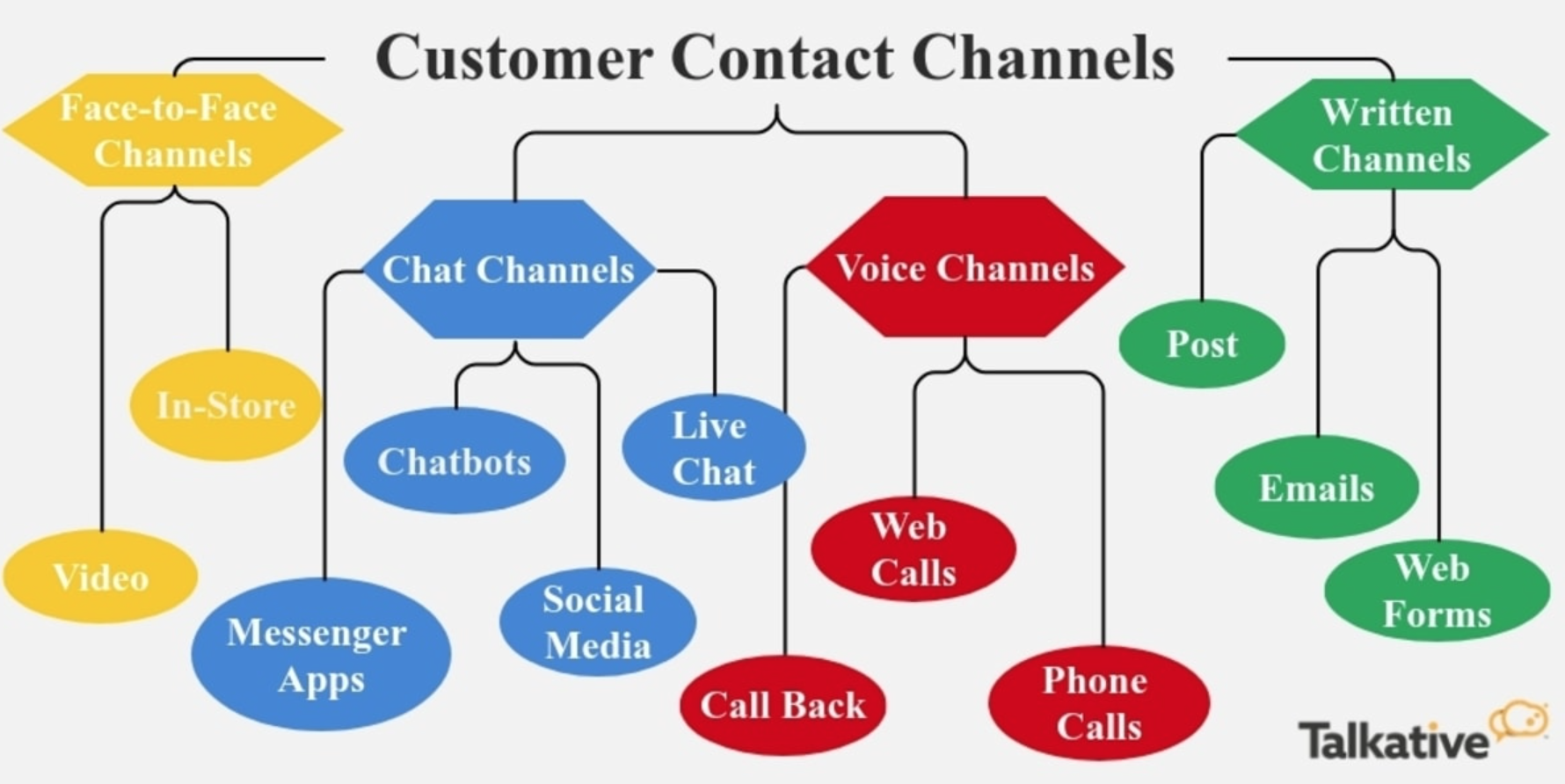
- Right communication channels in the right place.
- Bring your team together.
- Set KPIs for your team.
- Lastly, encourage video chats.

(Source)
Customer support teams are in direct contact with your customers and if not equipped with the right tools and software to resolve your customers’ issues and grievances, you might end up losing a few customers. And having communication tools and channels in place sits at the top of the priority list.
Emails and calls don’t cut it anymore. Your team should have proper customer support software to collaborate and provide support to your customers in real-time. Not having such software in place will leave your remote teams disoriented, disorganized, and grasping at straws.
Here are a few tips to help select the right customer support solution to tackle the new challenges of serving customers remotely.
- Choose software that has an all-in-one inbox to allow your remote customer support teams to provide multi-channel support.
- The software should have a self-service knowledge base for your customers to navigate through FAQs and for your customer support teams to onboard customers easily.
- The software should be equipped with social listening, monitoring, and responding to give your support teams the ability to collect user feedback.
- Having software that allows real-time communication tools like calls, chats, videos will enable your customer support team to deliver service and assist your customers in real-time. For example, if your customers have issues with your order fulfillment service, then they can reach out to your team and get the issues resolved in real-time.
Bonus: Read GrooveHQ’s guide to select the right customer service and support tools.
Tackling new challenges with a team that doesn’t get along becomes more challenging. Building good relationships with your team even if they live in different countries or operate in different time zones. Good relationships are the building blocks for happy and productive teams.
Around 39% of surveyed employees say that their organizations don’t collaborate enough and on the other hand, three out of four employers rated teamwork and collaboration as “very important”.
Clearly, there’s a communication gap that needs to be filled and leaders have to take initiatives to bring their teams together for effective and improved collaboration.
Here are a few tips and ways to bring your team together:
- Communicate every day in every way. Encourage informal team meetings as well so your team members can catch up with their colleagues about their lives, interests, and whatnot. Also, set a proper tone for communication. Ideally, it should be constructive, solution-based, and should be done during office hours.
- Do team-building exercises. We know how cringy and obvious team-building exercises are but we end up having fun and understanding our team members better. Here are some cool team-building exercises you can try with your team.
- Recognize your team’s efforts and reward them with bonuses, extra off-days, company-wide appreciation emails, promotions, and more. The more your team feels recognized, the more productive and content they are with their jobs.
- Focus on the strengths of your team members. Pointing out flaws and weaknesses only decreases their self-esteem and thereby affecting their productivity. Being constructive and uplifting with your feedback is the way to go.
- Graciously accept differences of opinions. It’s not healthy to want all your team members to agree with your all the time. Sometimes disagreements bring out the best and innovative ideas.
Bonus: Learn more about team building from Jostle’s 12 straightforward ways to improve teamwork
Acknowledge your team members’ career paths and set their KPIs and goals accordingly. With remote working, it’s quite easy to forget goals and your team’s professional goals.
Whether you are managing a remote team or an in-house team, it is your responsibility to take care of their growth, monitor and evaluate their performances regularly, and provide constructive feedback that will help them perform better.
Here are a few customer service and support KPIs and metrics to track:
- Average response time: Track the time your team takes to respond to your customers’ requests. The lower, the better.
- First call resolution: Monitor if your team can resolve your customers’ queries in the first call. The higher the FCR rate, the more efficient your team is.
- Net promoter scores: The NPS denotes the favorability of your customers recommending you based on their overall experience with your organization and customer service.
- Total tickets and tickets by customer: Tracking the number of tickets per customer will help you allocate your resources more conscientiously. And the overall number of tickets will help you identify major problems with your products and thereby equipping you with the required data to create better FAQs.
- Volume by channel: This KPI will help you prioritize the most important channel where you can allocate more resources. You can also automate the channels rarely used by your customers.
Bonus: For a detailed understanding of Customer Service KPIs, read Netomi’s guide on the same.
Use technology to bond with your team members. It is the best way to have face-to-face time with your team members, when physical face-to-face is not possible, virtual will have to do. Video conferencing tools like Zoom, Skype, Hangouts are universal, free, and easy-to-use.
Moreover, people have a higher average attention span in video calls compared to audio calls.

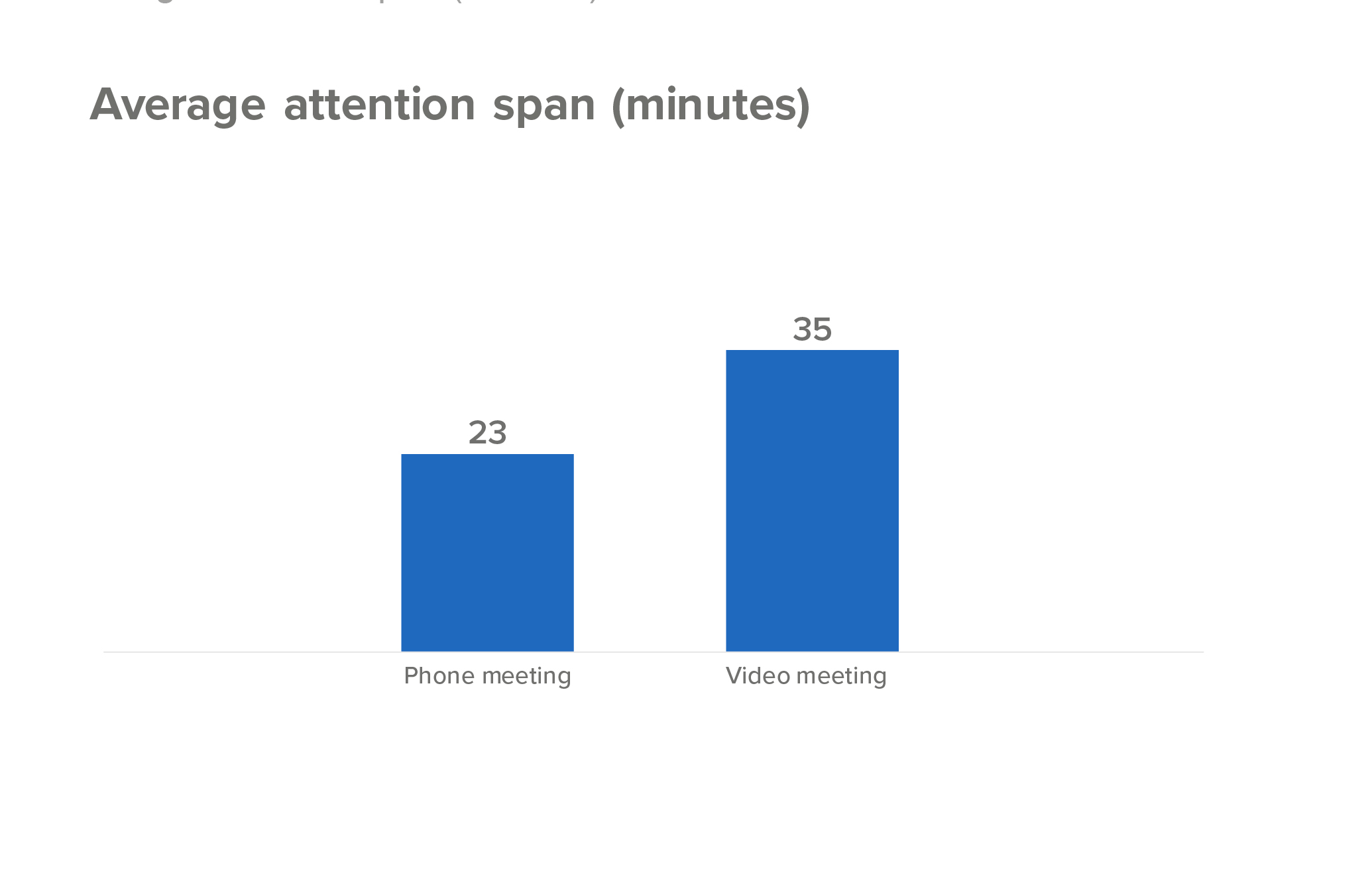
Video calls actually improve team collaboration and communication, allows the team to solve problems in real-life, and boosts participation and attendance.
Here’s how you can make the best of your video conferencing calls:
- Ask everyone in the team to choose a quiet and appropriate location, whenever possible.
- Inculcate the habit of being on time in your team.
- Ask everyone to turn their videos on and if someone’s uncomfortable for certain reasons, then don’t force them.
- Make sure everyone’s on mute except for the speaker.
- Have an agenda and someone in charge to steer the meeting in the right direction.
Some extra useful tips for better team management before part ways
- Clearly communicate with your customer support team about your customers. Who they are, what are their values, what do they need or are expecting from the support team, etc.
- Have a thorough knowledge base for your support team to access important information in a matter of seconds. This will directly help in reducing average handling time.
- Review your team’s communication like emails, calls, chats, etc. on a regular basis to provide them with necessary feedback and improve customer service.
- Find creative ways to interact with your teams like hosting a virtual lunch or potluck, playing a virtual drinking game, or Pictionary.
- Make sure your remote team has all the basics for remote working. Even though we are mentioning it at the end, this should be your first step.
Managing remote teams might look like a mighty task but as a matter of fact, it’s not. The key lies in understanding your team, their needs and motivators, and the problems they face on a regular basis. Once you are equipped with this information, you will lead your team in a better, more productive, and empathetic way.
With Crowdfire, you can find curated content, schedule your posts, engage with your audience, deep-dive into analytics and create custom reports. Now introducing Social listening. Try it for free.