



Email and social media are arguably two of the most potent channels out there for businesses to execute their marketing efforts. Now, imagine the plethora of possibilities you will make yourself privy to should you manage to effectively integrate both.
“But, is that even possible?”
Of course, it is! In fact, that’s precisely what we are going to talk about in this article. Curious to see what we have in store? Read on to find out!
1. Upload contacts from your email list to your social networks
One of the best ways to strengthen your customer relationships is by putting a face across their names. How can you go about it? By uploading your subscriber’s list to all the various social media platforms you use. Doing so, also allows you to take a closer look at their social media feeds, thereby providing you with greater insight into their profiles. And the more you know about your subscribers, the easier it becomes for you to address their pain points. And this uploading business is quite straightforward too! Take a look.
For Twitter:
- Go to your business’s Twitter account and navigate to the “Find people you know” link. You should be able to spot it on the left sidebar. Alternatively, you can also locate it underneath the section titled “Who to follow”.
- Next, you need to connect your email address (personal or professional, depending on what your requirement is). You have the choice of importing contacts from Gmail, AOL, Outlook, and Yahoo.
- After selecting a contact book, you will have to grant permission to Twitter to access it. To do the same, click “Allow”.
- Now, Twitter will run all your contacts’ email addresses past its own database in order to verify them. Once this process is over, you will be able to see your subscribers’ profiles on this platform. To keep an eye on their interests and preferences, you can follow them.
For LinkedIn:
- Open your business’ LinkedIn page. Go to the tab named “Connections”. Hover over the same to obtain a pop-up menu.
- From among the options in this menu, select “Add Connections”. You will get shown a list of popular ESPs from where you can import your contacts. But, this is not the only route that exists. Instead of uploading contacts from ESPs, if you want to feed a CSV of your subscriber list, you are free to do so. You just have to select the “Any Email” option.
- As soon as the file finishes uploading, you should be able to see your contacts’ LinkedIn profiles. Be a part of their network by sending them a connection request to get a better understanding of what kind of content they engage with on this platform. Another thing you can do is invite them to join your organization’s official LinkedIn page (that is, if you have one, in the first place)
Remember, on Facebook, you won’t be able to build a professional network using your contact list the same way you would be able to on Twitter and LinkedIn. However, what this platform lets you do, is send targeted ads in your customer’s way. This, in turn, paves the path for higher conversions. In the following steps, we explain how you can go about it:
- Navigate to the “Ads Manager” section on your business’s Facebook profile.
- Click the link titled “Audiences”. You should be able to see the “Create Audience” button.
- Click on it to access a pop-up menu. Select “Custom Audience”, and then “Customer List”.
- Now, you will be required to upload either a CSV or TXT file of your contacts.
- Once your custom audience is defined, you can start designing suitable ads for them.
2. Promote your social media handles on your emails
Want to call attention to your social media accounts? Leverage your emails. Create dedicated campaigns to urge your mailing list to follow you on social media. Tell them about the kind of content you post there and what they are missing out on. This technique is a great way to organically increase your social media follower base.
Take a look at this innovative email by Virgin.


3. Do not forget to include social media buttons
We understand that this is probably very stapled advice but you’ll be surprised to learn just how many businesses overlook it. Usually, brands prefer to add these buttons in the email footer. This practice spares your subscribers from manually looking up your social accounts on the web. This way, a single click will transport them over there. Win-win for both of you, isn’t it?
Take a look at this email from Rivian to understand how brands typically go about the placement of these buttons.

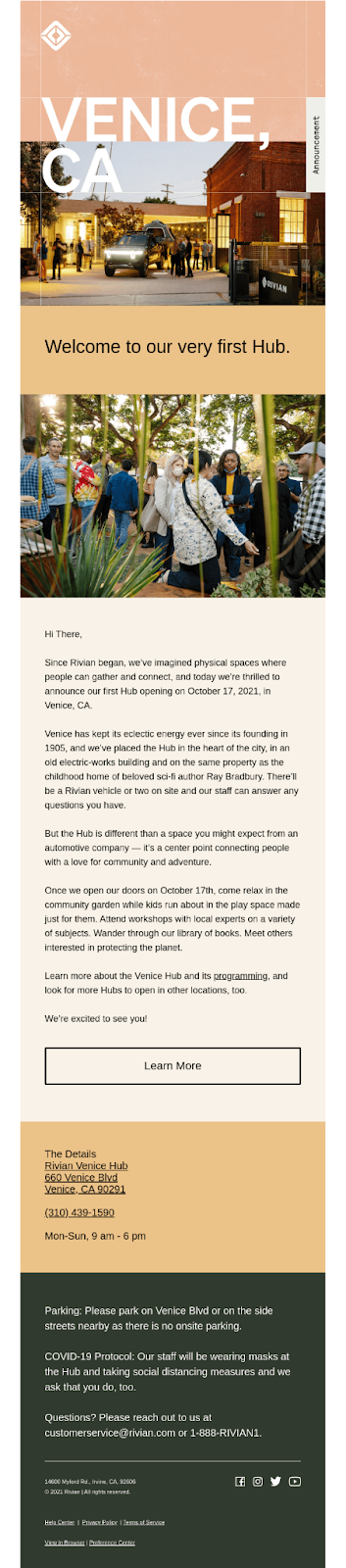
A crucial detail that businesses must pay attention to while adding these buttons is their design. You must ensure that their look and feel align with the design language of your entire email. Otherwise, it might appear extremely incongruous.
4. Use social media to grow your mailing list
There’s a very good chance that not all of your social media followers are subscribed to your newsletters or marketing emails. Well, it’s about time you added them to your email list too.
How do you ask? By setting up a call-to-action button. The process is rather simple.
On Facebook, you have to open your business page and select the “Create Call-to-Action button. A drop-down menu will appear on your screen. Here you have to click “Sign up” and specify the designated URL. Once done, visitors will be able to clearly spot this button the moment they arrive at your page.
While Twitter doesn’t really have any provisions to create a CTA button, it does provide you with lead generation cards to gather your follower’s email addresses. They contain a brief description, an image (which is customizable), and a CTA. To put these cards into action, you simply have to attach them with your tweets.
5. Give subscribers the choice of sharing your email across social media platforms
Besides including social media buttons in your emails, you should also make them shareable across social media platforms. That way, whenever your subscribers happen to resonate with any of your emails, they will be able to spread the word of it among their friends, relatives, and followers. Essentially, it’s free marketing, and why would you want to say no to that? (To encourage your subscribers to share your content, you have to put in a lot of hard yards. So, this “free marketing” doesn’t really happen magically, but you get our drift, don’t you?) Subsequently, this increases the visibility of your campaigns, fetching you new leads in the process.
6. Repurpose your email content into social posts (and vice versa)
While email and social call for vastly different brands of content, we’re sure that occasionally you’ll arrive at an idea that will find relevance across both. If you think any of your newsletters contain sufficient contact for a series of social media posts, give it the requisite spin as warranted by these platforms and publish it. Similarly, if you feel any of your social media ideas have good email potential, dive deeper into the topic and present a detailed version of it to your subscribers.
Wrapping it up
We hope the points discussed above have given you the necessary insight to get started with integrating social media and email marketing. Combining them will allow you to get the best of both these incredibly potent channels and propel your business miles ahead of your competitors.