


The road from ‘Registered User’ to a ‘Paying Customer’ might only be a couple of clicks away, but the route is, usually, the toughest of all.
There are three important milestones in a customer’s journey. All three are for customer engagement and product adoption:
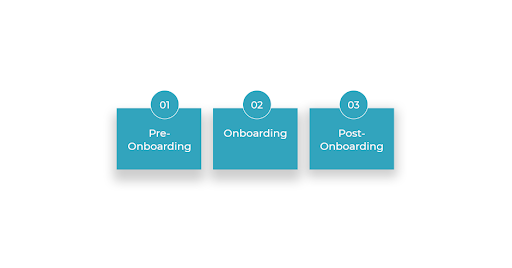

- Pre-Onboarding: Getting the Customers to Sign Up
- Onboarding: Encouraging the customers to make their purchase
- Post-Onboarding: Retain the customer for recurring purchases
These three interlinked steps, when executed correctly with value-driven information – build credibility, engage potential customers, and eventually lead subscribers to take action.
Why Customer Onboarding?
40 to 60% of Software users log in only once after they’ve signed up. The majority never log in again.
According to Hubspot, SaaS startups lose 75% of their new users within the first week of product acquisition.
These statistics are enough to shatter the myth that getting customers to signup is where the ‘win’ happens. In fact – it is merely the first step to conversion.
Customer Onboarding acts as:
- A solid Acquisition strategy
- An excellent Retention strategy
An exceptional onboarding strategy increases customer lifetime value, reduces churn, increases retention rate, and turns new users into long-term fans.
Two more reasons for every startup to stick to customer onboarding:
- Most of the revenue is generated from existing customers.
- Satisfied customers become top sources of word of mouth referral.
7-Steps to Customer Onboarding via Emails:
1. Welcome Email
70% of the subscribers who sign up for a new service expect a welcome email.
Welcome Email is your first chance to reveal value-driven information about your product and set metrics for future interactions, so tread carefully. Build rapport, present yourself, and make a good impression.
Welcome Email’s purpose is to:
- Move users to the next step
- Build on the signup momentum
- Set a tone for their experience
Here are few Welcome Email examples which any SaaS company can use:
1. Survey Monkey
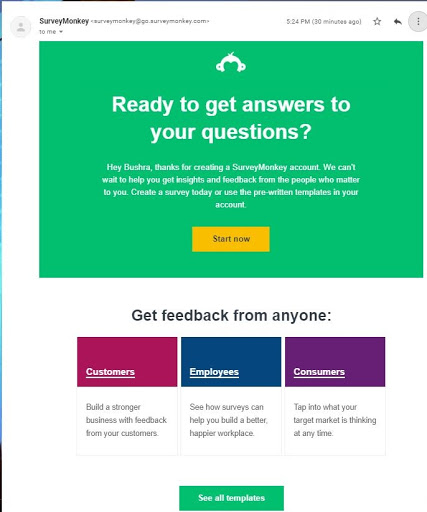

Survey Monkey’s Welcome Email is simple yet engaging. Not only does it give customers an idea of the product, and also make them know how it can be helpful for them.
What’s good about this email:
- Survey Monkey ditched the regular Welcome to X, and replaced it with a clear question directed to the customer. The header also reminds users what they can do with Survey Monkey.
- The email body informs the customer about common use cases of Survey Monkey, which is getting feedback from employees, customers, and consumers.
- Again, they excluded the generic ‘get started,’ and instead made user’s next action very specific by asking them to choose from the 3 common templates
2. Troop Messenger
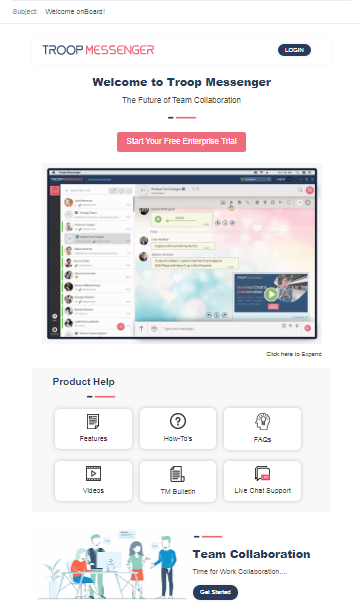
Troop Messenger’s welcome email has clear, concise instructions on how the subscriber can start using the product. They’ve mapped out their first onboarding mail in a way that is visually appealing and yet simple.

What’s good about this Email:
- The header is bland, but short and direct.
- Troop’s Welcome Email calls attention to important elements. It’s not loaded with too much information that may cause onboarding overwhelm, and yet it manages to guide users through product features, FAQs, How-To’s, and more.
- Clear CTA in the email
3. Groove
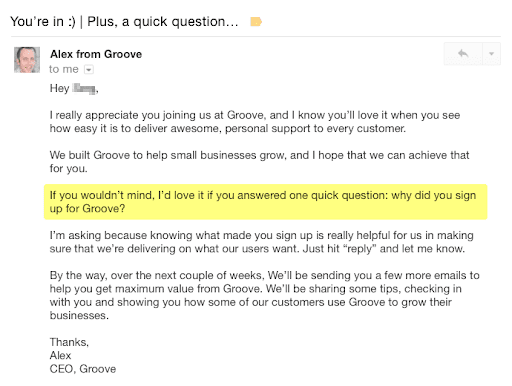
Onboarding is as much about a product/service as it is about the entire customer experience. We learnt this lesson from Groove. Check out their welcome email:

What’s good about this Email:
- Groove, through their first onboarding email, makes a subtle attempt at building relationships with the users, by asking a question about user intent. Getting insight might help Groove improve their onboarding process.
- Furthermore, they also set expectations by informing the mail recipient that they’ll be sending a few more emails over the next couple of weeks.
2. Triggered Emails
For the next step, you can use triggered emails based on specific actions taken by your visitors after they sign up. Often referred to as ‘behavioural marketing automation,’ it helps marketers in sending automated messages on the basis of a user’s behaviour.
A trigger emails means:
- Increased customer engagement
- Better Marketing retention rates
- Higher customer satisfaction
- Improved click-through rate
Here are few examples to take inspiration from:
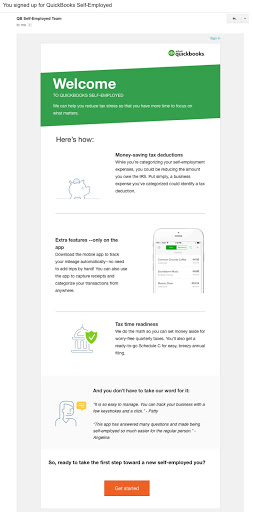

1. QuickBook
What’s good about this Email:
- After a user signs up for Quickbooks free trial, they first send an email that fills the knowledge gap about using their product, and nudges the customer to reach that ‘Aha moment.’
- Later, based on a customer’s behaviour and the features they’ve identified valuable, Quickbook sends a more specific email. This email by Quickbook seems like a well-thought retention effort. Here again, one can see how they’ve converted CTA buttons into a small task.
2. Typeform
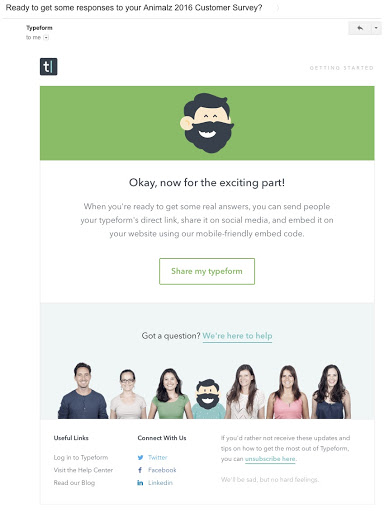

What’s good about this Email:
- Typeform sends their registered users this email when they’ve created a survey but didn’t finish. The email is a great example of getting users engaged long before their inactivity becomes a matter of concern.
- When used correctly, the triggered emails improve user experience and increase engagement. The deciding factor is if you’re providing useful information versus ignorable noise.
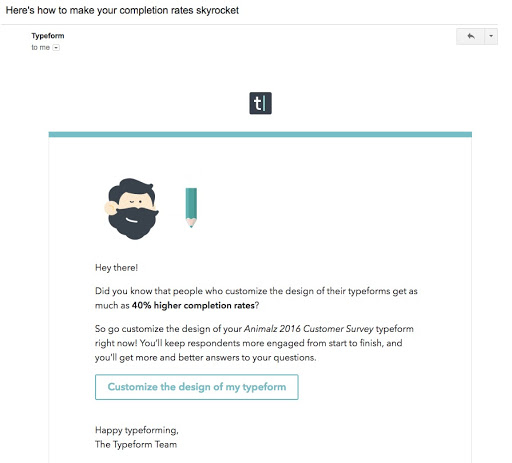

- When the previous email doesn’t work, typeform makes another attempt, using a different angle. In their next email, they educate the user about how a customised design can help them get more success with their surveys.
- Focusing on numbers and statistics is a smart way of communicating value of a product – more like a grounded proof instead of bombarding promotional messages that aren’t connected with user context.
3. Zapier
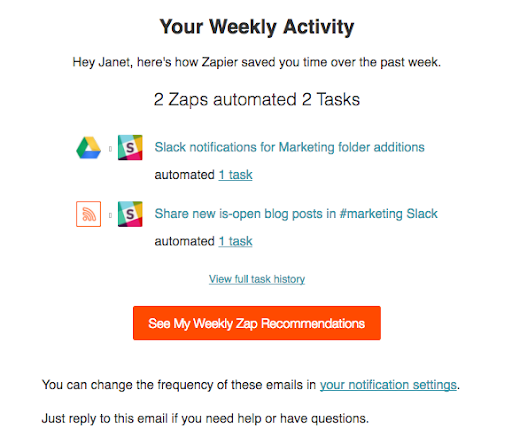
What’s good about this Email:
- Zapier also focuses on numbers to communicate their product value.
- To send these triggered emails, they leverage data about a user’s feature usage, make suggestions connected with user context, and increase engagement in a new manner.
The golden rule of these triggered emails is ‘be relevant for your users.’ Sending these emails not only provide relevant information to users at different stages of their lifecycle, but also encourage product engagement and build trust.

Bonus Tip: Think of new and creative ways of personalizing these onboarding emails. Since video marketing is trending, you can make a personalized video or GIF and show them the best feature. Personalized emails get 18% higher open rates than regular emails.
3. Operational/Engagement Emails
For the engagement emails, you must create a feature-rich onboarding sequence in the context of the user’s use case. This works wonderfully if your SaaS product is complex. Make sure that you don’t put in too much information in a single email. No one reads emails these days.
The point is to make them aware of the biggest benefit of using the product. Give them one single but striking feature that answers the question:
‘Why should I use this product rather than an alternative?’
The keyword here is ‘Feature,’ and not features. So, don’t brag about what the product can do. Do not drown them into ‘here’s all the great things about the product.’
For Example, look at the following Onboarding Emails:
1. Slack


What’s good about this Email:
- One of the most common onboarding mistakes is asking the users to do so much at once. It can be overwhelming. Your operational/engagement emails should comprise of small & simple steps.
- Slack could tell users about their messaging, video conferencing, and tons of integration, but instead, their onboarding flow prompts a user to set notifications.
- Slack ditched ‘get started’. Instead, it gives users a small assignment: set notification. Small tasks are faster, less overwhelming, and simpler than larger ones.
2. ProdPad
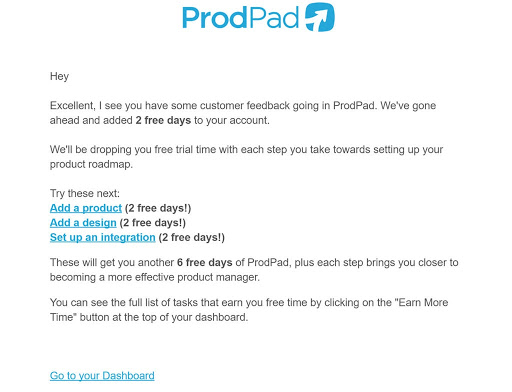
ProdPad, before sending a final sales pitch, sends a ‘reward’ to their users for completing their onboarding actions. They send this reward in the form of 2-days extension of the free-trial period.

What’s good about this Email:
It leverages the power of gamification – they drop free trial extensions with each step a user takes towards setting up their account, so that each step brings them closer to completing their onboarding journey. Such emails drive customers to beat their own score and give them positive enforcement.
Bonus Tip: Start these emails with a problem statement, a question, or an Eye-Opening statistics that is relevant in the context of the user’s use case.
4. Interactive Walkthrough
An interactive walkthrough is one of the most significant onboarding Emails. Not only does it teach the users about getting value from the product but also reduce the churn.
An interactive walkthrough may look similar to unique feature callouts, except that their main motto is to school the users about easy, and effective ways of using all the features shared through the previous mails.
The best way to inform customers about a product is to let them use it themselves.
- Use an interactive and conversational tone, and persuade them to learn about the product through video/tutorials.
- Make sure these videos/tutorials are not complex. It should be easy to follow through.
Check out these two examples to get a better understanding of creating an interactive walk-through email:
1. Slack

What’s good about this Email:
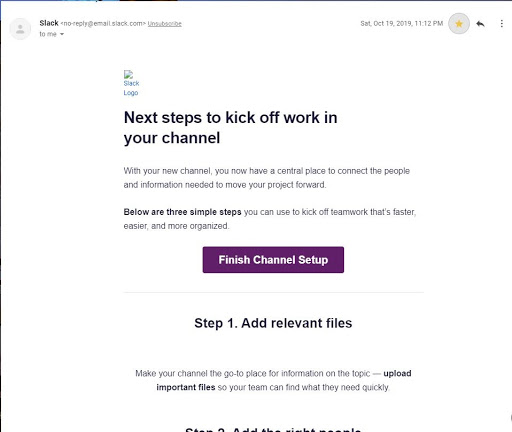
You know what’s better than telling a user to take action? Showing them exactly how to do it – just how Slack does in its onboarding email:
- Instead of telling about their all specialities, Slack calls attention to accomplishing one important task, and shows them how to take action through a clear list of steps. The goal is not to show features of the product to the user but to entice them to go and try out the feature.
- Guides users to specific action (not just get started) & Includes a link to a quick start guide (Finish Channel Setup)
- Arrives with user context – the mail arrived as a result of my behaviour on Slack and came almost immediately after I set up my workspace
2. GMass
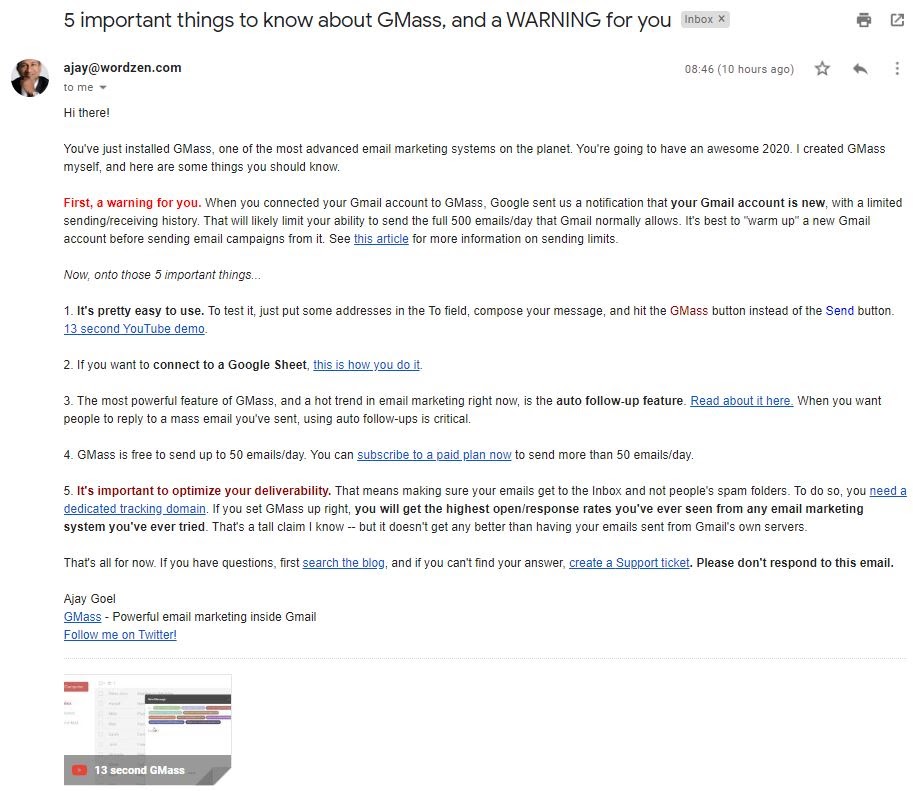

- Subject line attracts attention with a reference to important things they’ll all want to know.
- GMass’s onboarding email answers common questions users have about using GMass for mass mailing. That’s very useful as it cuts down on the number of queries and support requests from new users. The email body gives the recipients some steps to follow.
- Links for both support tickets and paid plans.
For Product Tour, you can try the following steps:
- Step 1: Set a conversion goal throughout the tour
- Step 2: Hook them by telling an upfront value of the product
- Step 3: Be outcome, not output, driven.
- Step 4: Reduce the number of steps
- Step 5: Avoid overload of information
Bonus Tip: For these emails, always use behaviour-triggered emails since it’s crucial to track their behaviour. Observe and understand how they are behaving, whether or not they are following the tutorials, and draft the next mail accordingly.
5. Social Proof Email
Social proof is one of the most compelling strategies for influencing a customer’s buying behaviour. Case Studies are one of the most effective ways of acquiring new customers. If you don’t have a detailed case study, use social proof email to highlight client’s testimonials, collection of reviews, and ratings.
With Social proof email, validate the product around a variety of angles, including but not limited to:
- Reviews and Ratings
- A detailed case study
- Results of successful case study
- Results of the survey around the product
- Recommendations
- Testimonials
You can take inspiration from FreshBooks Social Proof Email:


What’s good about this Email:
- FreshBooks talk about their product, but from a value perspective (benefit of their product), and not their features. It makes sense they inform about product value before talking about the product.
- Real name mentioned in the email builds trust with the user. Another point to take notice about Freshbook is they introduce one value per email – the rest follows with the next emails.
Bonus Tip: Write subject proof emails with customer-centric and solution-oriented subject lines. For Example, “How XYX increased 300% Engagement.”
6. SaaS Check-up Email
While the before-mentioned five emails can be sent to all the subscribers, check-up email must be customized based on the target user’s inactivity. These check-up emails are for lost users. The users who started a trial, were engaged in the beginning, but didn’t buy the product. For these lost users, use onboarding emails as a strategy for fighting the churn.
Here again you can use behavioural tracking to stand ahead of competitors.
To do site-based behavioural tracking, utilise in-app analytics for sending emails that increase customer’s interest in a product and assure its relevance.
You can use tools like KiSSmetrics to make these emails based on behavioural triggers, and as specific as possible.
These check-up emails must be tailored according to a customer’s inactivity or activity and they should push them towards becoming paid members by making them reflect on what they are missing. In this step, the key ingredient is personalization.
Check out these examples:
1. Grammarly:

What’s good about this Email:
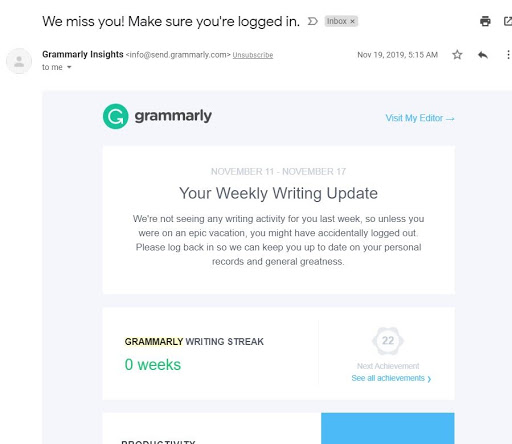
- Grammarly Uses Gamification to turn a behaviour into habit (there are achievements to be unlocked) – which can be a great strategy for SaaS companies to onboard and retain more users.
- In this email, Grammarly also highlights a user’s progress within the app, features they may not have seen, and encourages the user to experience the product again.
2. Duolingo:
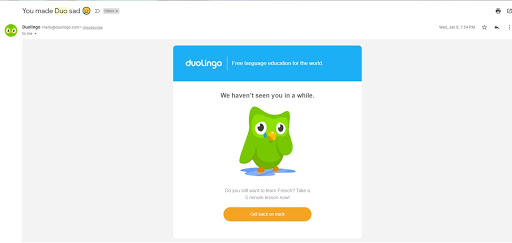

What’s good about this Email:
- Much like Grammarly, Duolingo also uses gamification to improve user onboarding. When applied appropriately within a SaaS user context, gamification can make onboarding real fun.
- Duoling’s onboarding Email rocks not only because it arrives as a result of a user’s behaviour but also because it uses Emotional Trigger for the Subject line.
3. ProPad
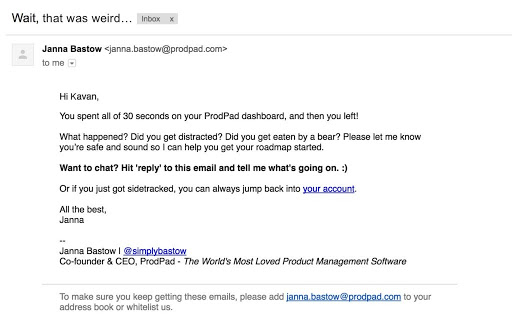

What’s good about this Email:
- There is something that can vastly improve your chances of converting a user – asking them to do a single thing. ProPad sends this email to their Silent users, who sign up and then become inactive.
- The email looks casual and silly but questioning an inactive user about their inactivity is a great strategy of conversion.
- ProPad first asks them about the problem, offers a chance to talk, and closes the email with a link to log back in. Such single-action emails allow SaaS companies to break the ice and show off their super fast customer support.
Bonus Tip: Don’t forget the customers who are currently using the products. They are just as important as the ones you’re trying to acquire.
Send a ‘Check-In’ email to the existing customers. Make them feel that you care about their progress, check whether they are getting stuck, and identify how you can help them obtain more value through the product.
7. Sales Pitch Email
At some point in the email-onboarding sequence, you’ll reach the last stage and go for a close.
Since SaaS customers rarely make immediate or impulsive purchases, you must convince them of your expertise. By using the above six steps, you’ve already given them enough time to learn, explore, and assimilate the essence of the product. Now is the time to reap the fruits.
Sales Pitch Emails are best sent during the last three days of the free-trial period. Make sure not to be too salesy. Pitching doesn’t necessarily mean hitting the users with another sequence of spam messages.
Here are a few tips for Writing Sales Pitch:
- The last email should directly appeal to them to click the buy button, but at the same time, keep the personal & personality driven approach going.
- Combine this email with a short survey of all the clients who converted.
- Combine the sales pitch with an appeal for those who didn’t convert, and ask them to write their feedback, comments, suggestions, and questions.
1. Squarespace
Check Out Squarespace’s Sales Pitch
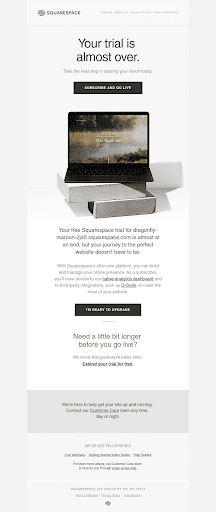

- Squarespace has mentioned the name of the website – adding a touch of personalisation. They’ve made a good attempt at converting a free user into a paying customer, without being too salesy.
- Squarespace didn’t assume their user knows everything about SquareSpace just because they’re at the end of the trial period – the second paragraph thus gives a brief about the product’s benefit and top features.
- And the best part, they don’t put too much pressure on the user, instead offers them an option to extend their free trial.
2. ProPad
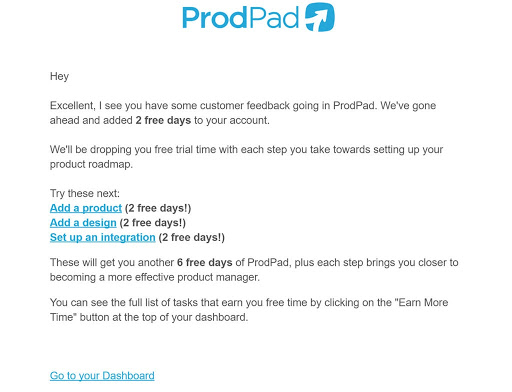
ProPad, before sending a final sales pitch, sends a ‘reward’ to their users for completing their onboarding actions. They send this reward in the form of 2-days extension of the free-trial period.
What’s good about this Email:
It leverages the power of gamification – they drop free trial extensions with each step a user takes towards setting up their account, so that each step brings them closer to completing their onboarding journey. Such emails drive customers to beat their own score and give them positive enforcement.
Writing an Engaging Sales Pitch:
- Step 1: Start with a problem statement or a question.
- Step 2: Share an Eye-Opening statistics
- Step 3: Highlight unique differentiation of the product
- Step 4: Provide a clear reference
- Step 5: Share customer stories and example
- Step 6: Close the pitch with an open ended question
Bonus Tip: Follow the sales pitch with a ‘last-chance email pitch’ and make the users feel that you are giving them one more chance to upgrade into paying customers. Combine this step with a personalised discount offer to get more leads.
Summing Up
The key takeaway of these seven steps is to always consider that the person receiving these emails is human. Every email must feel as if you’ve written it personally. While writing these emails, remember that all these onboarding emails are meant to pave the way for stronger relationships, deeper conversations, and loyalty.
With Crowdfire, you can find curated content, schedule your posts, engage with your audience, deep-dive into analytics and create custom reports. Now introducing Social listening. Try it for free.