
 Posted by
 Crowdfire and Hootsuite equip you with a complete toolset for managing social media profiles. However, after testing them and comparing their features, pricing, and usability, I realized they’re made for audiences with different needs.
Crowdfire is an excellent choice for small businesses and content creators who need an affordable scheduling platform with content curation and social listening tools. It excels in discovering relevant articles and images, customizing RSS feeds, creating tailored posts for every social media platform, and even includes an AI caption writer. Additionally, its built-in social listening capabilities provide an edge in trend spotting and informing social media strategies.
Start with Crowdfire’s free plan and manage up to three social accounts!
Hootsuite, on the other hand, is tailored for larger businesses and marketing teams that need comprehensive social media management features. Its interface is straightforward and use-case-focused and its standout features include a unified inbox for managing messages and mentions, robust analytics, and integrated ad management — it’s best used to manage multiple brand accounts.
Start Hootsuite’s 30-day trial and continue for $99/month after
In this comparison, we compare Crowdfire vs Hootsuite in the following key areas:
- Pricing
- User Interface and Navigation
- Content Scheduling and Publishing
- Inbox and Messaging
- Analytics and Reporting
- Social Listening
Let’s dive deeper to help you determine which platform aligns best with your social media needs.
Crowdfire vs Hootsuite: Comparison Summary
| Crowdfire | Hootsuite |
|---|---|
 |
 |
Price |
|
|
Four-tier approach from Free to VIP |
Three-tiered pricing structure: Professional ($149/month), Team |
User Interface and Navigation |
|
|
Granular interface with a top toolbar for specific toolsets, opening left-side menus for individual features, offering more detailed control but requiring additional navigation. |
Straightforward, use-case-focused interface with clear menus for key functions like Dashboard, Plan, Create, and Analytics, enabling quick access to essential tools. |
Social Listening |
|
|
Excels in social listening with keyword projects, mention tracking, conversation analysis, relevant hashtag identification, and exportable lists. |
Offers basic social listening tools and plans to upgrade this capability with its recent Talkwalker acquisition. |
Content Scheduling and Publishing |
|
|
Excels in “Content Curation” with tools for discovering articles and images, customizing RSS feeds, and AI for writing captions. |
Provides a comprehensive suite with calendar view, bulk uploads, AI content ideation, and integrated social media ad management and scheduling. |
Inbox and Messaging |
|
|
Lacks a unified inbox for DMs but tracks mentions, comments, and replies in a dedicated “Mentions” menu. Enables you to instantly reply with images, videos, and gifs. |
Provides a unified inbox for messages |
Analytics and Reporting |
|
|
Custom reports for Facebook, Instagram, LinkedIn, Pinterest, and YouTube. Tracks growth, engagement, and post-performance. Advanced paid features. No X analytics due to API changes. |
Analytics for 7 platforms including TikTok. Custom reports, engagement tracking, best posting times. Includes competitor analysis, team performance, ad analytics, industry benchmarking. |
Best For |
|
| Small businesses and content creators who need affordable social media scheduling, content curation, and social listening tools. | Large businesses and marketing teams who need unified messaging, detailed analytics, and integrated ad management to manage multiple brand accounts. |
| Click here to get started with Crowdfire’s free forever plan! | Click here to get started with Hootsuite’s 30-day trial! |
Crowdfire vs Hootsuite: Detailed Feature Comparison
Crowdfire vs Hootsuite: User Interface and Navigation
Hootsuite provides a straightforward, use-case-focused UI with clear-cut menus for Dashboard, Plan, Create, Inbox, Analytics, Ads, and additional features. This design makes it easy for users to quickly access the social media tools they need.

In contrast, Crowdfire offers a more granular, user-friendly interface.
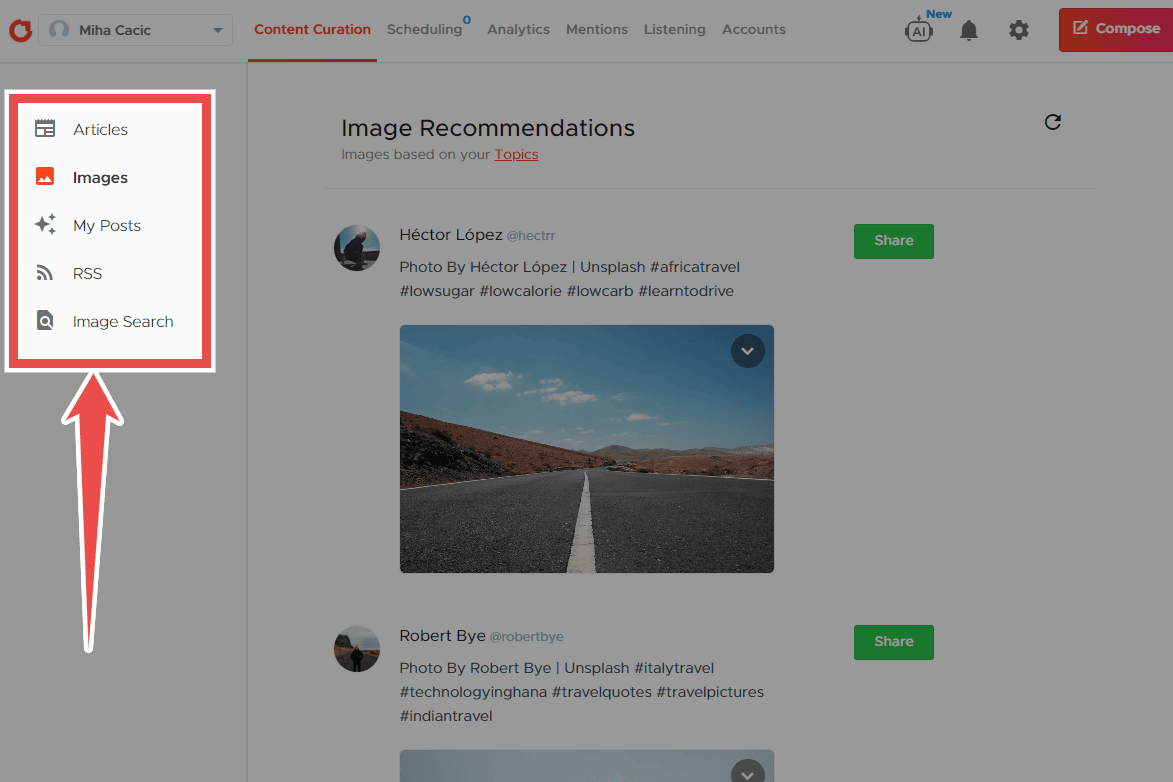
The main toolbar at the top allows users to choose specific toolsets such as Content Curation, Scheduling, Analytics, Mentions, Listening, and Accounts. Each toolset then opens a different menu on the left for individual features. While this requires more navigation, it offers clearer access to individual features.

Crowdfire vs Hootsuite: Content Scheduling and Publishing
Both platforms provide robust content management capabilities but with distinct strengths.
Hootsuite offers a comprehensive suite including a calendar view, support for various post types (including Pinterest pins and ad campaigns), bulk uploads, and an AI assistant for content ideation and repurposing evergreen content. Its standout feature is integrated social media ad management and scheduling.
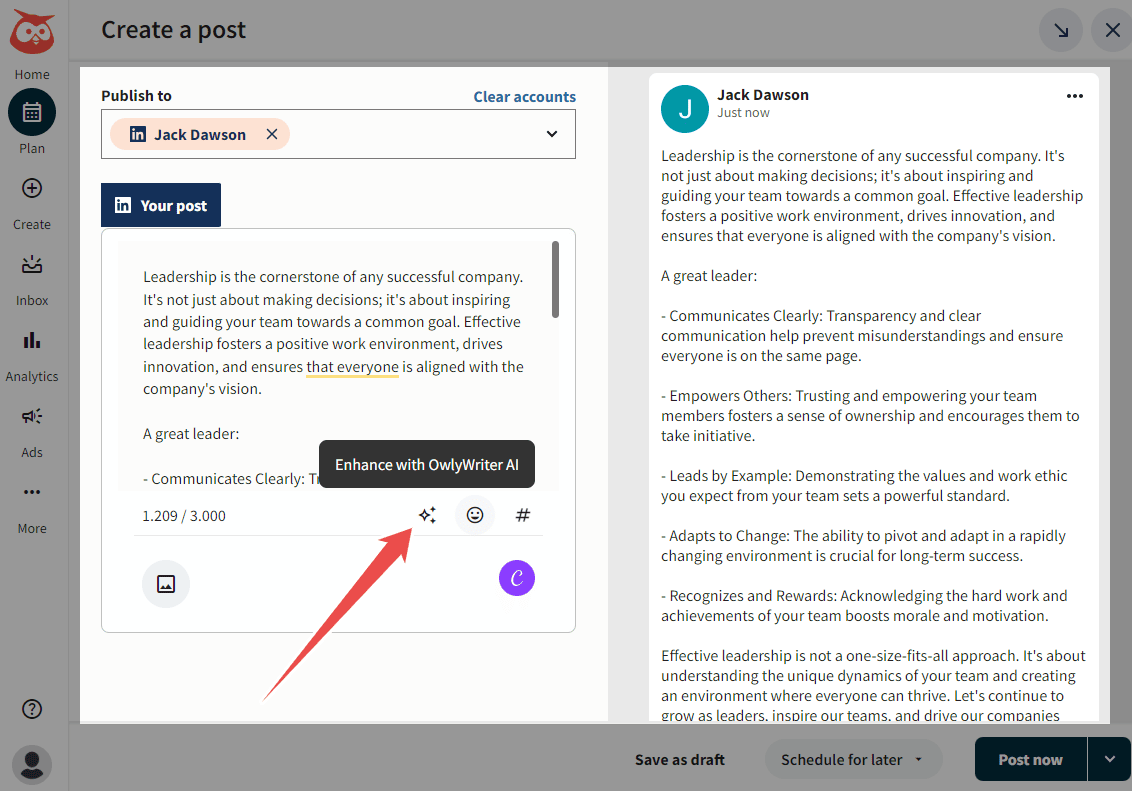
Crowdfire matches many of these features but focuses on organic social media marketing, rather than ad management. It excels with its “Content Curation” toolset, allowing you to discover relevant articles, images, and RSS feeds, and even search for stock images — an advantage for content creators who frequently curate and repost content. It also includes a convenient AI tool for writing captions.
Crowdfire’s “Customize caption for individual accounts” feature is worth noting. Unlike Hootsuite, it allows you to modify your post format to fit every social media account and avoid having to make separate posts for every account. It’s especially useful to save time if you’re managing many different types of accounts.

Overall: Crowdfire’s content curation tool gives it an edge for creators focused on reporting and reposting content, while Hootsuite’s ad management features make it more suitable for comprehensive social media marketing.
Crowdfire vs Hootsuite: Social Listening
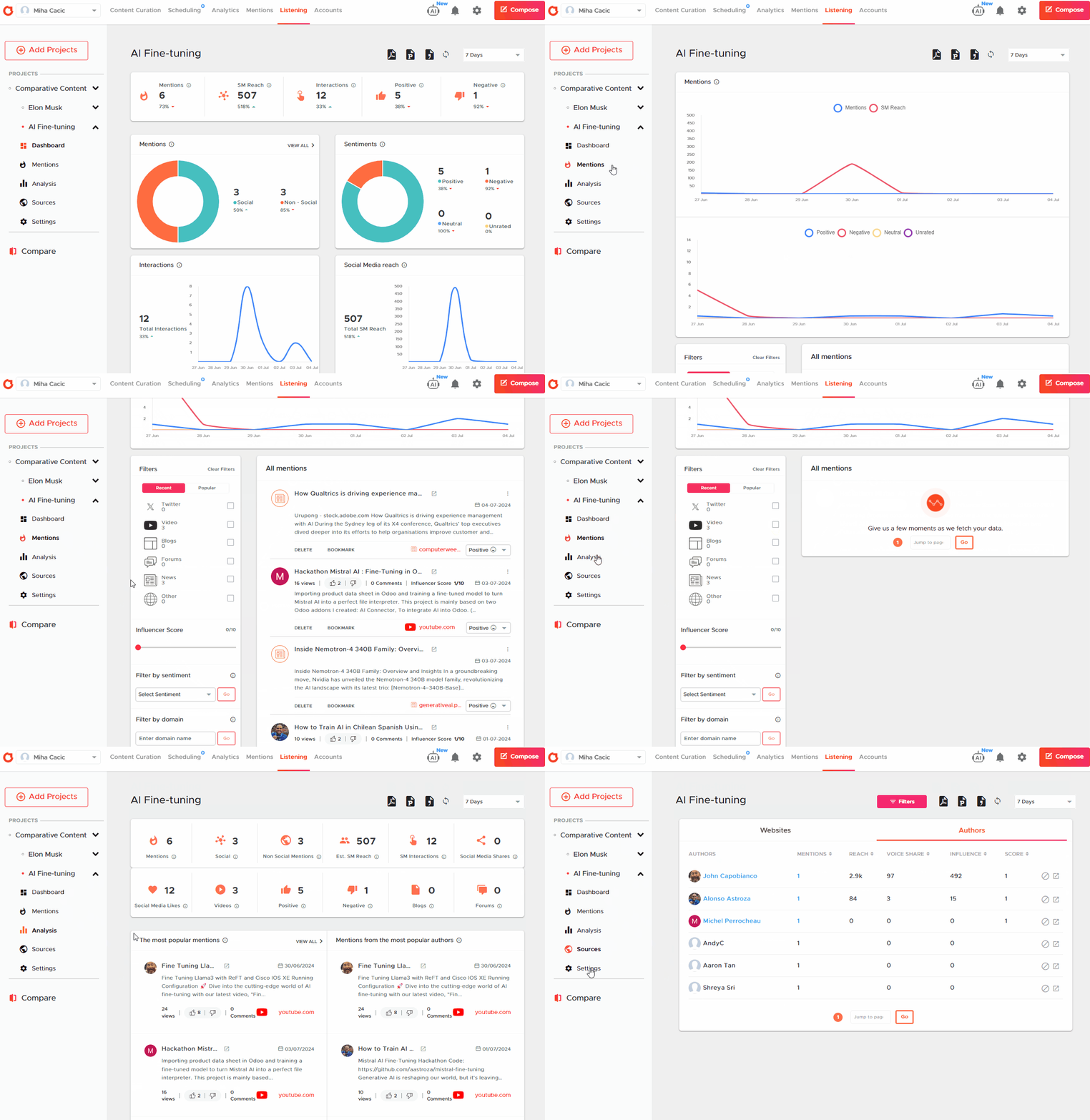
Here, Crowdfire undoubtedly takes the lead with its built-in social listening toolset. It allows you to:
- create projects around specific keywords,
- track social media mentions,
- analyze conversations by sites, social profiles, sources, countries, and more,
- identify relevant hashtags,
- and export lists of websites or creators discussing the topic.
Hootsuite includes some limited social listening with its “Streams” feature, which allows you to see posts that mention a specific hashtag or keyword. This feature is basic compared to Crowdfire but Hootsuite recently acquired Talkwalker and plans to integrate social listening tools, but this feature is not yet natively available.
Crowdfire vs Hootsuite: Inbox and Messaging
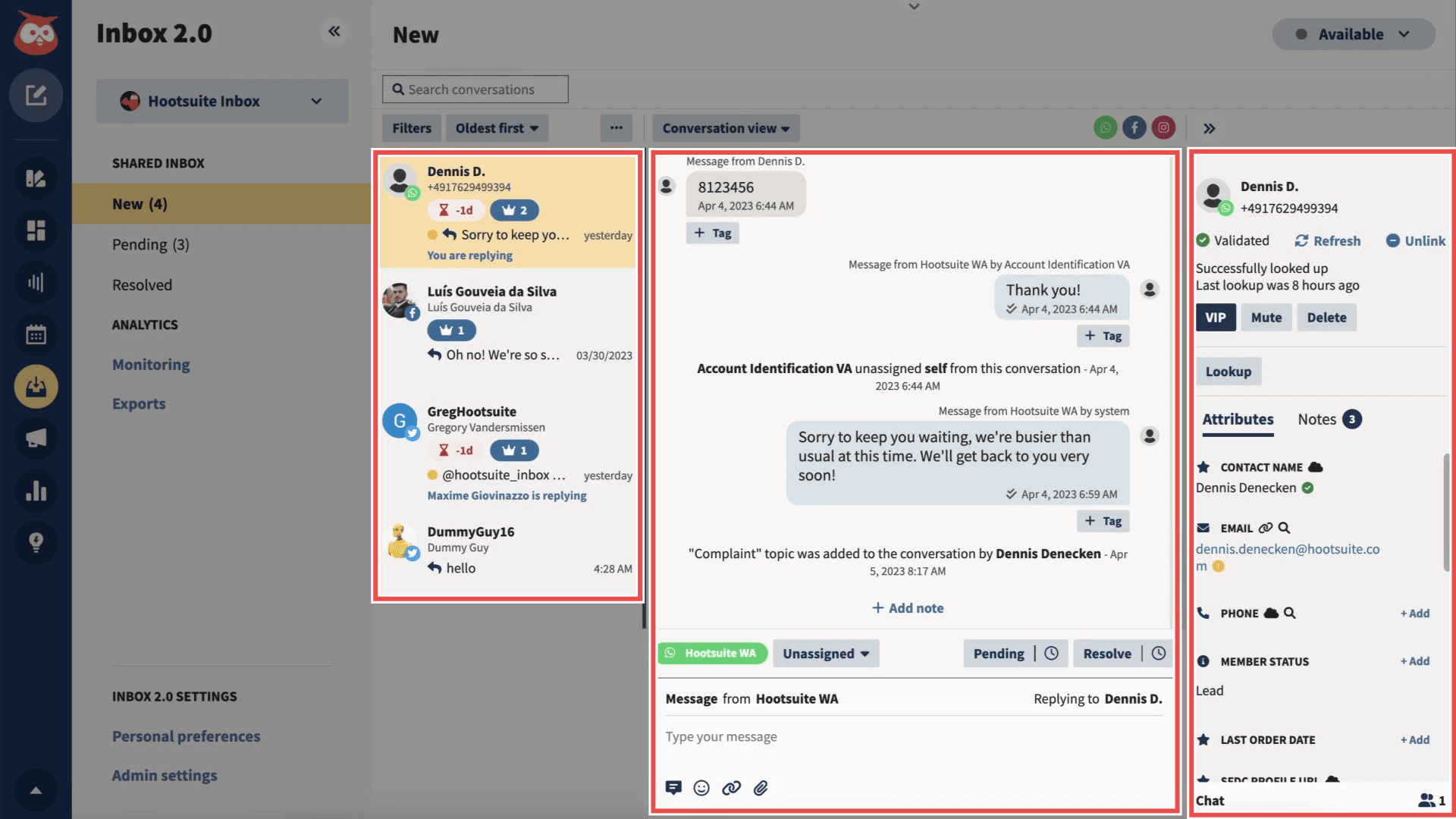
Hootsuite offers a unified inbox that collects incoming messages and mentions from multiple social media platforms and accounts. It allows you to reply directly or set up auto-replies. Higher-tier plans even include a virtual agent for handling FAQs.
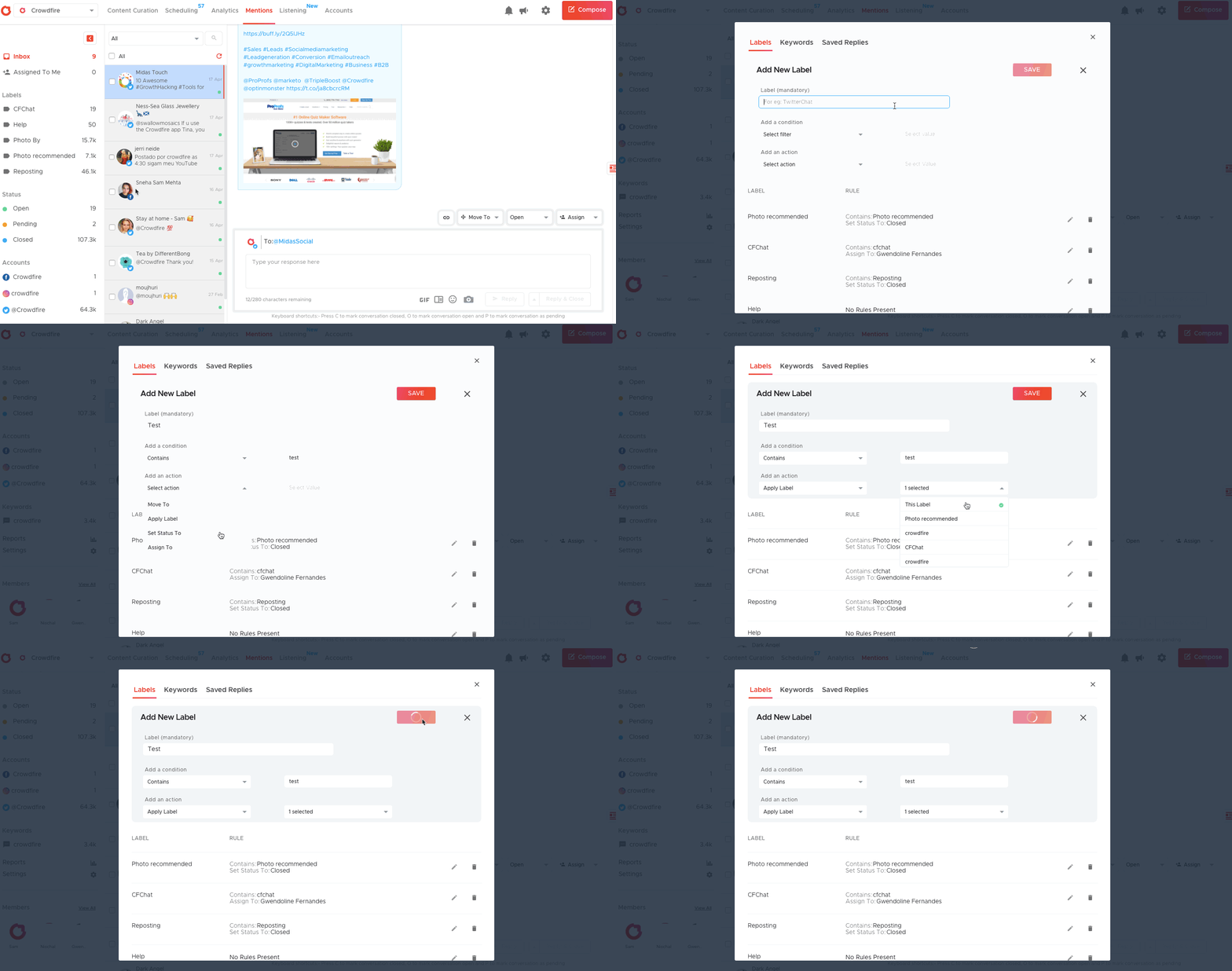
Crowdfire doesn’t provide a unified message inbox for DMs. However, it does track all social mentions, comments, and replies in a dedicated “Mentions” toolset so you can engage with your audience in a single dashboard and reply quickly and effectively.
Crowdfire vs Hootsuite: Analytics and Reporting
Both platforms offer comprehensive analytics with custom report creation using widgets.
Hootsuite’s analytics support tracking social media performance for Facebook, Instagram, X, LinkedIn, Pinterest, YouTube, and TikTok. You can set up reports for different time periods (yesterday, last 7 days, or last 30 days) and create custom reports. It lets you track key metrics such as audience growth, engagement, post-performance, and the best times to publish. Hootsuite also offers competitive analysis features, allowing users to compare their content strategy and performance with competitors. Advanced features include team performance tracking, ad analytics, and industry benchmarking.
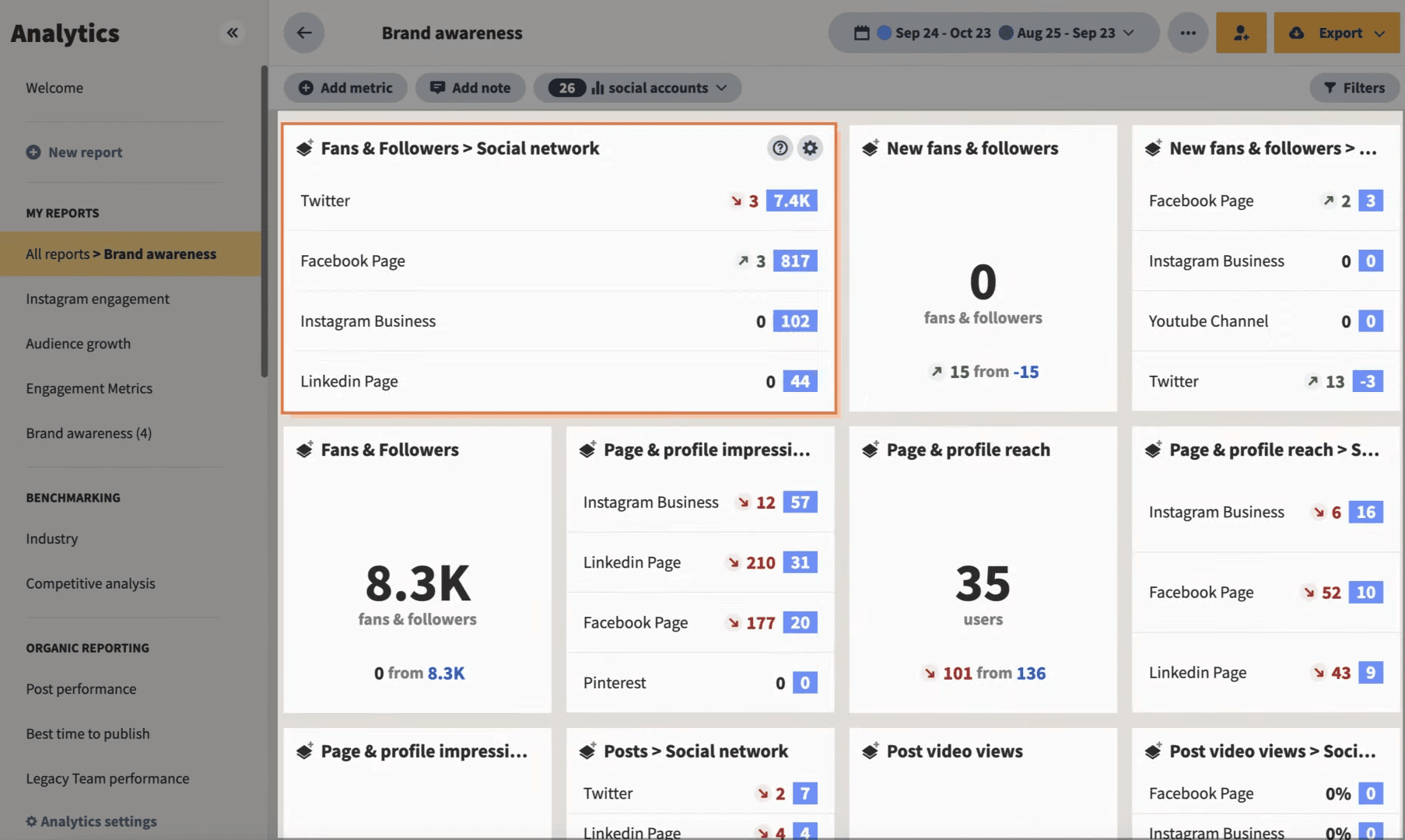
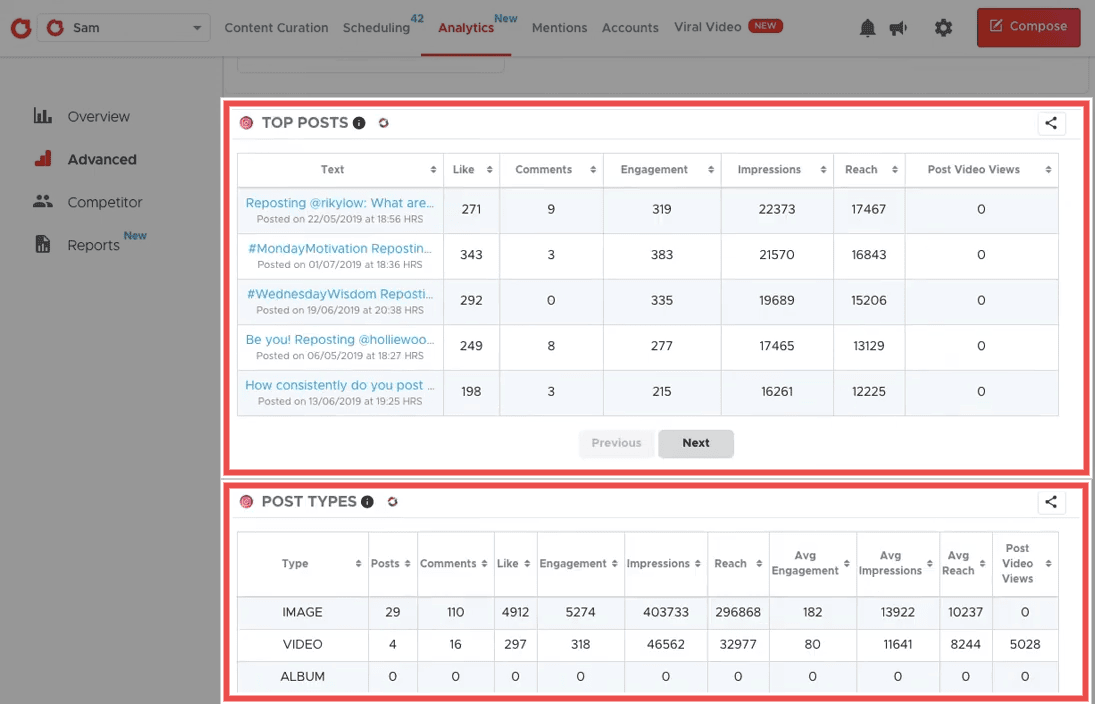
Like Hootsuite, Crowdfire’s analytics toolset also allows you to create custom reports with widgets to track key metrics like audience growth, engagement, and post-performance across social media platforms (Facebook, Instagram, LinkedIn, Pinterest, and YouTube). You can set reports to different time periods (yesterday, last 7 days, or last 30 days) and download them in PDF or PPT formats.
On paid plans, you get access to advanced analytics and post-level data with deeper insights into audience demographics, sentiment analysis, and individual post metrics.
Notable limitation: Crowdfire doesn’t support X (Twitter) analytics due to their latest API changes.
Overall: Hootsuite offers more comprehensive analytics, covering seven platforms including TikTok and X, while Crowdfire supports analytics for five different social media channels but not for X (Twitter). Both provide custom reports and key metric tracking, but Hootsuite’s unique features like competitive analysis, team performance tracking, and industry benchmarking make it better suited for larger businesses and agencies. Crowdfire’s simpler interface and focus on core metrics may appeal more to small businesses and individual creators, especially those not prioritizing X analytics.
Functionality verdict: Hootsuite is better suited for businesses looking for a comprehensive social media management platform with strong ad management capabilities and a unified inbox. Its straightforward UI makes it accessible for users of all levels.
Start Hootsuite’s 30-day trial and continue for $99/month after.
Crowdfire stands out with its content curation features and built-in social listening tools but lacks ad management and unified messaging features. Its more granular UI and focus on content discovery make it ideal for content creators and businesses focused on trend analysis and content curation.
Start with Crowdfire’s free plan and manage up to three social accounts!
The choice between the two will depend on whether ad management and unified messaging (Hootsuite’s strengths) or content curation and social listening (Crowdfire’s advantages) are more crucial for your social media strategy.
Crowdfire vs Hootsuite: Pricing
Hootsuite offers plans for midsized to large businesses, while Crowdfire provides more accessible, scalable options for individuals and growing businesses.
Hootsuite’s pricing structure caters to a wide range of social media management needs but is not fully disclosed.
Hootsuite’s pricing is infamously not fully disclosed on their website.
Their pricing page only shows you the monthly price with an annual subscription, while, if you go through the signup process, you see the monthly subscription is quite higher:
| Professional | Team | Enterprise |
|---|---|---|
| $149/month 1 user 10 accounts $99/mo on annual |
$399/month 3 users 20 accounts $249/mo on annual |
$16,000+/year* 5 users 50 accounts (only annual) |
Its Professional plan offers just enough key features to boost efficiency without overwhelming you with complex tools. It’s ideal for individual marketers or small businesses looking to streamline their social media presence across multiple platforms.
The Team plan is made for growing businesses or marketing departments that need collaborative features and more robust analytics to drive strategic decision-making.
Meanwhile, the Enterprise plan is tailored for large corporations or agencies managing multiple high-profile brands. It offers the scalability, security, and advanced features necessary for complex, multi-faceted social media strategies across multiple accounts and teams.
You can try it out with a 30-day free trial.
Crowdfire’s tiered pricing approach is designed to grow with its users’ needs.
| Free | Plus | Premium | VIP |
|---|---|---|---|
| $0/month 3 accounts 10 scheduled posts |
$9.99/month 5 accounts 100 scheduled posts |
$49.99/month 10 accounts 100 scheduled posts 1 additional team member |
$99.99/month 25 accounts 800 scheduled posts 2 additional team members per profile |
Note: You get 25% off with an annual subscription.
Crowdfire’s pricing is fully transparent so you know what you’re getting into. The Free plan is perfect for individuals or startups just beginning to explore social media management tools, offering a taste of automation without financial commitment.
The Plus plan suits solo entrepreneurs or small businesses ready to take their social media presence more seriously, with increased posting capacity and curation tools.
The Premium plan is ideal for medium-sized businesses or growing influencers who need more comprehensive features like bulk scheduling posts and competitor analysis to stay ahead in the social media game.
The VIP plan caters to established businesses or agencies managing multiple clients, offering extensive account linking and priority customer support for those who rely heavily on social networks for their business operations.

Pricing verdict:
Hootsuite is the more robust solution for businesses prioritizing team collaboration, in-depth analytics, and managing complex social media strategies across multiple brands or departments. Its higher price point is justified for organizations that view social media as a critical business function requiring sophisticated tools and insights
Start Hootsuite’s 30-day trial and continue for $99/month after.
Crowdfire, with its more accessible pricing and focus on content curation and scheduling, is better suited for individuals, small to medium-sized businesses, and those primarily looking to streamline their content creation and posting process. It offers a more gradual scaling of features, making it an excellent choice for users who want to grow their social media capabilities alongside their business without a steep learning curve or financial investment.
Start with Crowdfire’s free plan and manage up to three social accounts!
Crowdfire vs Hootsuite: Pros & Cons
Hootsuite offers a comprehensive and advanced feature set for larger teams, while Crowdfire excels in content curation and affordability, suiting individuals and smaller, growing businesses.
 |
|
| Crowdfire Pros | Crowdfire Cons |
| ✅ Excellent content curation toolset | ❌ Lack of integrated ad management features |
| ✅ Built-in social listening capabilities | ❌ No unified inbox for direct messages |
| ✅ AI tool for writing captions | ❌ Analytics don’t support X (Twitter) accounts |
| ✅ Gradual scaling of features, allowing users to grow their capabilities alongside their business | |
| ✅ Affordable pricing structure, especially for individuals and small businesses | |
 |
|
| Hootsuite Pros | Hootsuite Cons |
| ✅ Straightforward, use-case-focused UI | ❌ High price for small businesses or individuals |
| ✅ Robust content management capabilities | ❌ Limited social listening tools |
| ✅ Integrated social media ad management | ❌ More complex feature set |
| ✅ Unified inbox for messages and mentions | |
| ✅ Strong analytics and reporting features | |
Crowdfire vs Hootsuite: Final Verdict
Small-scale content creators will love Crowdfire’s toolset and affordability, while Hootsuite is better for large-scale, multi-brand social media management.
| Crowdfire | Hootsuite |
|---|---|
| Crowdfire is best for:
Small businesses and content creators who need affordable social media scheduling, content curation, and social listening tools. |
Hootsuite is best for:
Large businesses and marketing teams who need unified messaging, detailed analytics, and integrated ad management to manage social accounts for multiple brands. |
| Click here to get started with Crowdfire’s free forever plan! | Click here to get started with Hootsuite’s 30-day trial! |