

 Posted by
 After thoroughly testing Buffer, Metricool, and Crowdfire—managing multiple social media
accounts and analyzing their performance—I’ve uncovered distinct strengths and ideal use
cases for each platform:
Buffer shines with its intuitive interface and streamlined approach to social media
management. It’s the go-to choice for individuals, small businesses, and content creators who prioritize simplicity and efficiency in their social media workflow. While it may lack some advanced features, its user-friendly design makes it perfect for those who want to get up and running quickly.
Metricool stands out as a comprehensive all-in-one solution, offering robust analytics,
detailed planning tools, and even ad management capabilities. It’s ideal for small to medium-sized businesses and marketing agencies that require in-depth insights and are willing to invest time in mastering a feature-rich platform. Metricool caters to data-driven marketers who want to optimize every aspect of their social media presence.
However, neither Buffer nor Metricool fully addresses the needs of content-hungry social
media managers who struggle with consistently finding and sharing relevant, trending content
across multiple platforms.
That’s why I included Crowdfire in the comparison. It excels in content curation and social listening, making it the perfect tool for content creators, bloggers, and small businesses that heavily rely on sharing up-to-date, engaging content. With its focus on organic social media growth, Crowdfire is tailored for those who want to maintain an active and engaging social media presence without spending hours searching for content.
In this comparison, we’ll compare Buffer vs Metricool vs Crowdfire, examining their:
- User Interface
- Content Scheduling and Publishing
- Analytics and Reporting
- Social Listening and Content Curation
- Inbox and Messaging
- Pricing
By the end of this article, you’ll have a clear understanding of which tool aligns best with your
social media management needs and goals. Let’s get started!
Buffer vs Metricool vs Crowdfire: Comparison Summary
| Buffer | Metricool | Crowdfire |
|---|---|---|
 |
 |
 |
Price |
||
|
Four-tier approach: Free ($0/month), Essentials ($6/month), Team ($12/month), and Agency ($120/month). Affordable for individuals and small teams. |
Four-tier approach: Free ($0/month), Starter ($22/month), Advanced ($54/month), and Custom (custom pricing). Pricing suitable for agencies. |
Four-tier approach: Free ($0/month), Plus ($9.99/month), Premium ($49.99/month), and VIP ($99.99/month). Flexible pricing for various user needs. |
User Interface |
||
|
Clean, intuitive interface with straightforward navigation. Ideal for beginners and those who value simplicity. |
Contrasted interface with perceptive navigation but a lot of features. May require a learning curve but offers detailed control. |
User-friendly interface with clear categorization of features. Balances functionality and ease of use. |
Content Scheduling and Publishing |
||
| Buffer | Metricool | Crowdfire |
|
Efficient scheduling with calendar view and queue based posting. AI Assistant supports content ideation, but the other two have better text enrichment tools. |
Robust scheduling with calendar view, autolists, and AI-assisted content creation. Enables mobile & desktop preview of posts. |
Comprehensive scheduling with content curation features, AI caption writer, and autoposting at best times for boosting engagement. |
Social Listening and Content Curation |
||
|
No social listening capabilities apart from direct engagement. No built-in content curation tools. |
Decent social listening tools with hashtag tracking and competitor analysis. No built in content curation features. |
Excellent content curation tools and social listening capabilities. Helps discover trending content and track brand mentions. |
Inbox and Messaging |
||
|
Limited communication to comments only. Doesn’t support multimedia. |
Comprehensive social media communications for messages, comments, and reviews. Allows answering with multimedia and saved responses. Intricate filtering system. |
Unified inbox for comments, replies, and certain social media DMs in a dedicated “Mentions” menu. Enables you to instantly reply with images, videos, and GIFs. |
Analytics and Reporting |
||
|
Basic analytics with a comprehensive overview of engagement metrics and audience growth. Limited customization and exporting options. Works for Instagram, Facebook, Twitter, LinkedIn, and Shopify. |
In-depth analytics with customizable reports, competitor analysis, hashtag tracking, and ad performance tracking. Works for 10 social media networks, 3 ad networks, and more with Google Looker integration. |
Detailed analytics and custom reports with post-level, demographic, and growth data. Enables competitor analysis and hashtag tracking. Works for Facebook, Instagram, LinkedIn, and YouTube. |
| Buffer | Metricool | Crowdfire |
Best For |
||
| Individuals, small businesses, and content creators who prioritize simplicity and ease of use in social media management. | Medium-sized businesses and marketing agencies needing comprehensive analytics and ad management capabilities. | Content creators, bloggers, and businesses focused on content curation and maintaining an active social media presence across multiple platforms. |
| Click here to get started with Buffer’s free plan! | Click here to get started with Metricool’s free plan! | Click here to get started with Crowdfire’s free forever plan! |
Buffer vs Metricool vs Crowdfire: Detailed Feature Comparison
Buffer stands out with its ease of use and simplicity, Metricool has the most comprehensive analytics, and Crowdfire shines with social listening tools and content curation.
Buffer vs Metricool vs Crowdfire: User Interface
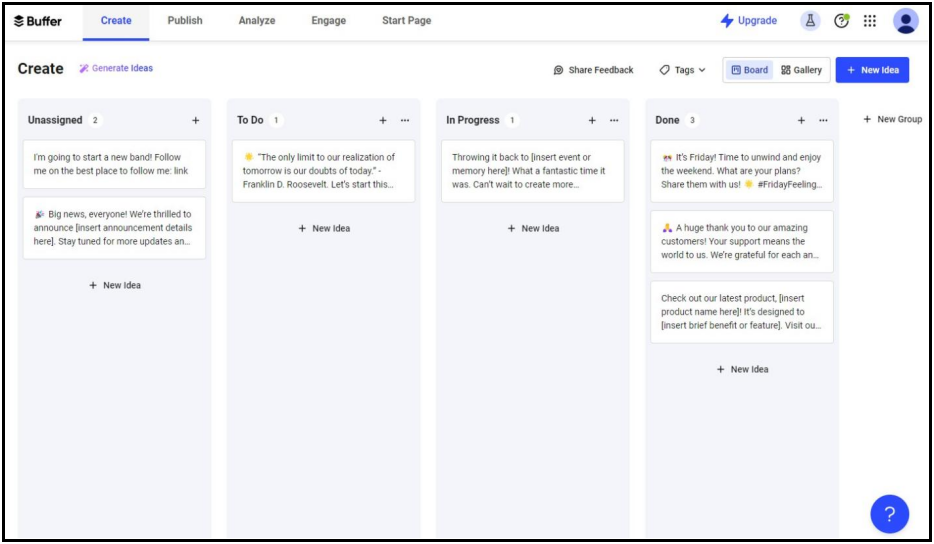
Buffer has a clean, intuitive interface. Navigation is straightforward, with a simple toolbar on top offering quick access to key tabs:
- Create — for content ideation and organization.
- Publish — for scheduling and publishing content.
- Analyze — for general and channel-specific analytics.
- Engage — for answering comments on social media.
- Start Page — for creating a custom link-in-bio page.
Buffer’s minimalist approach makes it easy to find what you need without feeling overwhelmed. This simplicity comes at the cost of some more advanced features (more on this below), but for many users, the trade-off is worth it for the ease of use.
Metricool offers a more comprehensive and contrasted interface. The navigation is organized into five main sections:
- Analytics — for automated, centralized, and detailed social media analytics.
- Inbox — for managing social media messages, comments, and reviews.
- Planning — for posting, scheduling, and approving content.
- SmartLinks — for creating a custom link-in-bio page.
- Ads — for managing, optimizing, and improving ad campaigns.

Crowdfire strikes a balance between Buffer’s simplicity and Metricool’s comprehensiveness. The top toolbar gives you access to specific toolsets:
- Content Curation — for curating articles and images fitting your topic of interest.
- Scheduling — for posting, scheduling, and tweaking your posts.
- Analytics — for measuring, tracking, and understanding your ROI.
- Mentions — for keeping up with messages and comments across your social media.
- Listening — for staying up-to-date on what people are saying about you or your competitors.
- Accounts — for an overview of all your connected social media accounts.
Each toolset opens a left-side menu for individual features, offering clear categorization without overwhelming you. Crowdfire’s approach makes it easy to access its wide range of features without sacrificing usability.

👉 Overall: If ease of use is your top priority, Buffer’s clean interface is hard to beat. If you need comprehensive tools and don’t mind a slight learning curve, Metricool offers the most detailed control. Crowdfire provides a good middle ground, offering a wide range of features in an intuitive interface, with particular strength in content curation tools.
Buffer vs Metricool vs Crowdfire:Content Scheduling and Publishing
Buffer’s content scheduling and publishing features offer a streamlined and effective approach to social media management.
It comes with a calendar view for easy visualization and planning across multiple social media platforms, along with queue-based posting that allows you to set up schedules for each social account and add content to the queue.

Buffer also supports team collaboration through approval workflows, offers a browser extension for quickly sharing content you find online, and image editing tools for last-minute adjustments.
Metricool offers a comprehensive suite of scheduling and publishing tools, which features a calendar view for planning and visualizing content strategies across multiple platforms, as well as Autolists for bulk scheduling and periodic publishing.
It provides suggestions for the best times to post based on audience activity and includes a content approval workflow for seamless collaboration with team members or clients.

The AI Social Media Assistant, which generates post ideas and content, allows you to customize AI prompts to match your brand voice and create platform-specific content. Metricool also enables multi-platform customization, letting you tailor posts and edit images on the go for each social network.
Crowdfire offers an extensive scheduling solution that mixes efficient scheduling with robust content curation features.
It comes with a calendar view for scheduling posts across social media platforms and content discovery tools for finding relevant articles, images, and trending content. Its standout content curation toolset helps you easily discover and share relevant content and you can also integrate RSS feeds to share content directly from preferred blogs.

Crowdfire also comes with an AI Caption Writer for generating customizable, multi-language captions and bulk scheduling for simultaneously uploading and scheduling multiple posts.
Like Buffer and Metricool, Crowdfire allows you to modify your post format to fit every social media account and avoid having to make separate posts for every account. It’s especially useful to save time if you’re managing many different types of accounts.

👉 Overall: Buffer is ideal if you want a straightforward approach to scheduling content. Metricool offers the most comprehensive AI assistance and approval workflow tools. Crowdfire provides the best balance of scheduling efficiency, content discovery, and AI-assisted writing, making it perfect if you struggle with consistently finding fresh content and creating engaging captions.
Buffer vs Metricool vs Crowdfire: Social Listening
Buffer’s social listening capabilities are limited, focusing mainly on basic engagement tracking for your social media posts. It allows monitoring comments and interactions but lacks more advanced features like keyword or hashtag tracking. This restriction means you can’t effectively track brand mentions, industry trends, or broader conversations about your brand or sector.

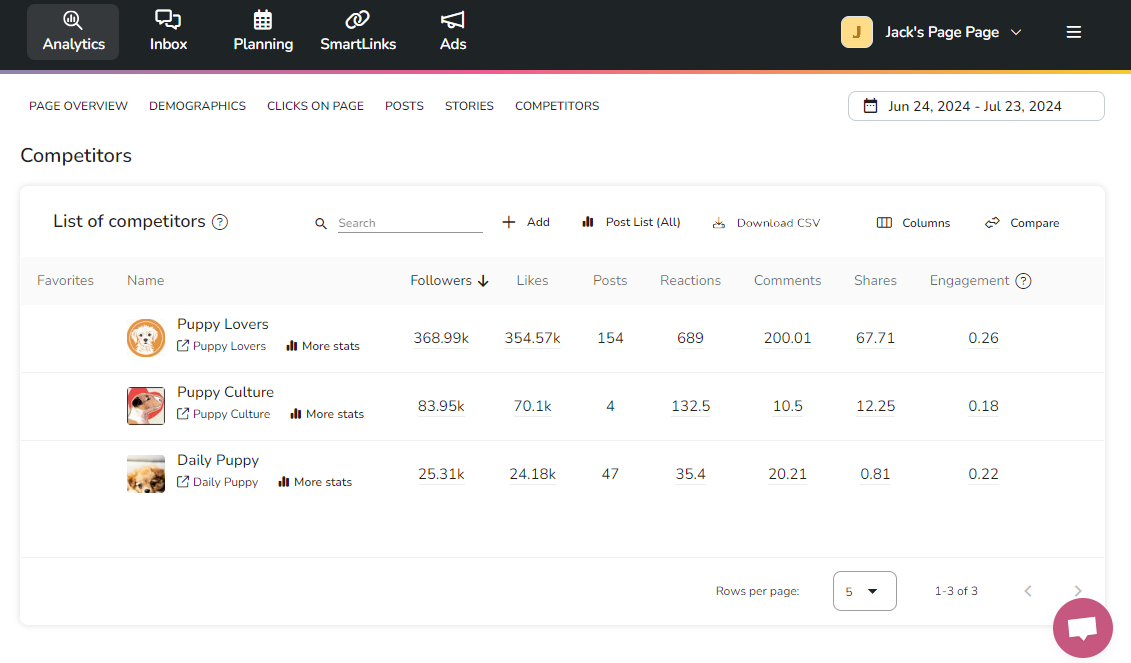
Metricool: provides a more comprehensive suite of social listening features than Buffer. Alongside its messaging tool that tracks direct engagement, it allows you to track the performance and usage of specific hashtags, offering insights into trending topics and campaign effectiveness.
It also includes competitor analysis tools, allowing you to monitor their activity and performance.
Crowdfire stands out with its comprehensive built-in social listening toolset for
monitoring and analyzing trends. It allows you to set up projects to monitor conversations, social
profiles, sites, and countries where specific keywords come up. Additionally, it allows you to export
lists of websites or creators discussing particular topics for targeted outreach and collaboration
opportunities.
 👉 Overall:If social listening is a priority for your social media strategy, Crowdfire is the clear winner. Its comprehensive suite of listening features provides valuable insights into brand perception, industry trends, and audience engagement. Metricool offers a solid middle ground with useful listening features. Buffer, while excellent for publishing, falls short in social listening and requires integration with other tools to fill this gap.
Buffer vs Metricool vs Crowdfire: Inbox and Messaging
Like I mentioned before, Buffer’s Engage feature offers a unified inbox for managing comments across multiple social platforms. However, it doesn’t support direct messages and doesn’t support replying with pictures.
Metricool offers a comprehensive Inbox feature that centralizes social media communications.
It allows you to manage messages, comments, and reviews from multiple platforms and supports replying with images. Metricool also includes a saved responses feature for quick replies, and a message filtering system that enables you to easily sort and locate specific types of messages or interactions.

Crowdfire has the Mention feature which serves as a comprehensive communication hub to respond to direct messages, comments, and replies.
Buffer vs Metricool vs Crowdfire: Inbox and Messaging
Its organizational tools allow for monitoring of message status—open, pending, or closed—to make sure nothing falls through the cracks. It also allows you to respond with images and GIFs and save time with your saved replies to common inquiries or comments.

👉 Overall: If comprehensive inbox management is a priority for you, Metricool and
Crowdfire are both excellent options.
Buffer vs Metricool vs Crowdfire: Analytics and Reporting
Buffer’s analytics feature supports insights from Facebook, Instagram, Twitter (X), LinkedIn, and Shopify.
The Home dashboard offers a quick overview of key metrics across all accounts, while the other tools allow you to analyze individual post performance, including engagement rates, reach, and impressions.
However, Buffer’s analytics have limitations: Meta currently disables demographic insights, and report customization is minimal, with users only able to add presets from the channel analytics dashboard.

Metricool’s analytics suite supports any social media channel you can think of.
Its dashboard provides an in-depth overview of performance across all platforms, while you can build custom reports using drag-and-drop widgets. It includes competitor analysis tools, allowing you to benchmark performance, detailed insights into content performance, audience interactions, and demographics to optimize strategies.
Metricool also incorporates ad performance analytics for Facebook, Google, and TikTok ads. For more advanced analytics, it integrates with Google Looker Studio, enabling connections with Google Analytics and Search Console data, though this feature is only available from the Advanced plan upward.

Crowdfire supports analytics for Facebook, Instagram, LinkedIn, and YouTube.
You can access a quick snapshot of key metrics across platforms through the Overview dashboard while diving into detailed insights for individual post performance and overall audience growth and engagement in the Advanced Analytics dashboard. A notable feature is competitor tracking, which allows you to monitor and benchmark performance against your competitors.
Crowdfire’s custom reporting functionality allows you to create and schedule tailored reports for clients, which can be exported as PDF or PPT files as well. For those requiring raw data, CSV exports are also available.
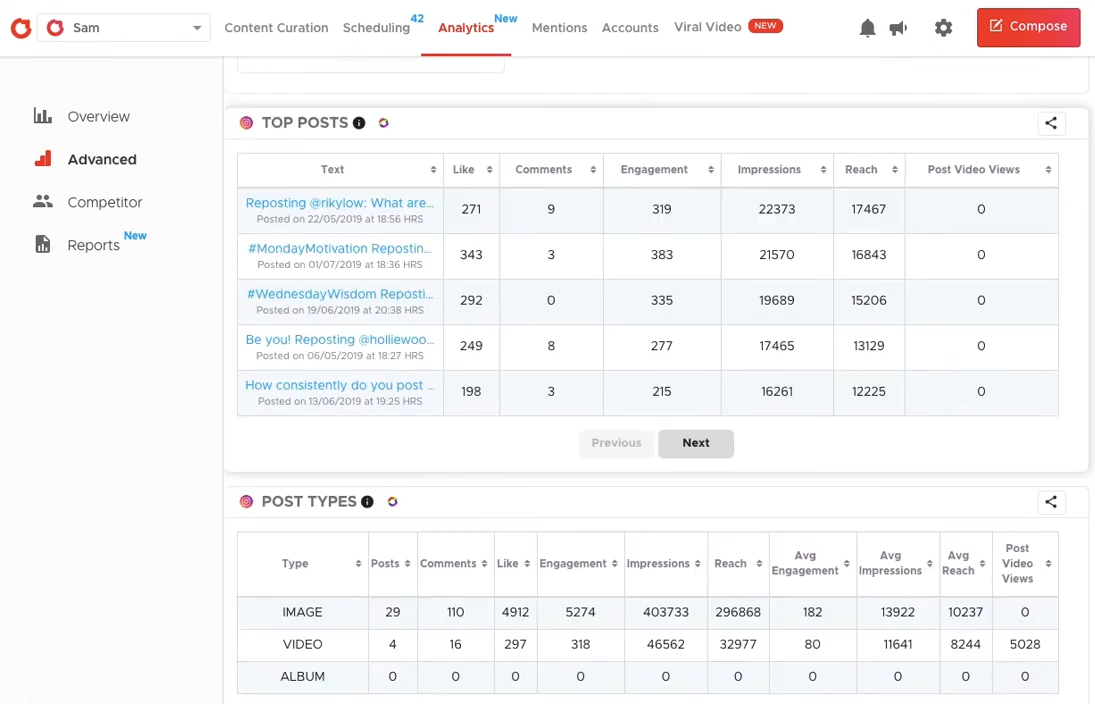
Overall: Metricool offers the most detailed insights and customization options, ideal if you need in-depth data analysis and reporting capabilities. Crowdfire comes with a comprehensive analytics package with unique features like competitor analysis, best for those focused on optimizing their content strategy. Meanwhile, Buffer’s analytics are perfect for those who need quick, easy-to-understand insights without complex data.
Functionality verdict: Buffer is best for individuals who prioritize simplicity and ease of use in their social media management tools. While it lacks advanced features in areas like social listening and analytics, its core functionality of content scheduling and basic engagement tracking is robust and user-friendly.
Metricool stands out as the most comprehensive solution, making it ideal for medium-sized businesses, marketing agencies, and data-driven social media managers. Its strength lies in its extensive analytics suite, robust inbox management, and integrated ad performance tracking.
Crowdfire shines as the best option for content creators, bloggers, and businesses focused on content curation and maintaining an active social media presence across multiple platforms. Its content discovery tools, AI-assisted caption writing, and social listening capabilities make it invaluable for users who struggle with consistently finding and sharing
Buffer vs Metricool vs Crowdfire: Pricing
Buffer is affordable for individuals, Metricool’s pricing structure is built for agencies, and Crowdfire’s pricing is the most balanced per number of accounts.
Buffer’s pricing is affordable if you don’t need to manage many social media channels.
Buffer offers a four-tier pricing model based on the number of channels. The following pricing applies to usage of a single social media channel, except for the Agency plan:
| Free | Essentials | Team | Agency |
|---|---|---|---|
| $0/month 1 user 1 channel (up to 3) 10 scheduled posts per channel |
$6/month 1 users 1 channel Unlimited scheduled posts + Analytics + Engagement + Notes |
$12/month Unlimited users 1 channel Unlimited scheduled posts + Branded Reports + Collaboration Features |
$120/month Unlimited users 10 channels Unlimited scheduled posts + Special Pricing |
Buffer’s pricing initially appears affordable, but it’s significantly influenced by the number of social media channels you need to manage. The cost is based on a per-channel rate, so the price increases with each additional channel with the starting price of a single channel. On the plus side, the free plan is generous, allowing you to manage up to three social accounts with limited features.
Metricool’s pricing structure caters best to agency users.
Metricool offers a four-tier pricing model designed for advanced users managing numerous accounts across various social media channels:
| Free | Starter | Advanced | Custom |
|---|---|---|---|
| $0/month 1 user 1 account for every channel + 5 competitor profiles + 1 SmartLinks Page + AI Assistant + Limited Analytics |
$22/month 1 user 10 accounts for every channel + 100 competitor profiles + Multiple SmartLinks Pages + Downloadable Reports + Unlimited Analytics |
$54/user/month Unlimited users 50 accounts for every channel + Team and Client Access + Post Approval System + Customizable Templates for Reports |
Custom pricing Unlimited users 50+ accounts for every channel + Custom Integrations + Looker Studio |
Metricool’s pricing may seem higher than Buffer’s at first glance, but it’s actually more affordable when considering the number of channels you can manage. With Metricool’s free plan, you can connect up to 14 channels, whereas with Buffer, managing the same number of channels would cost at least $84 per month.
Crowdfire strikes the optimal balance between the number of accounts and cost.
Crowdfire offers a flexible four-tier pricing structure, based on the number of accounts you want to manage and the features you need:
| Free | Plus | Premium | VIP |
|---|---|---|---|
| $0/month 3 accounts 10 scheduled posts + Basic Scheduling + Content Curation + Hashtag Recommendations + 1 Day Analytics |
$9.99/month 5 accounts 100 scheduled posts + RSS Feed Connect + Post Analytics + Up to 90 Day Analytics |
$49.99/month 10 accounts 100 scheduled posts + 1 additional team member + Mentions + Competitor Analysis |
$99.99/month 25 accounts 800 scheduled posts + 2 additional team members per profile + Priority Support + Custom Analytics |
Crowdfire sits between Buffer and Metricool when it comes to pricing for the number of accounts, offering a good balance for those with a mid-range number of social media accounts. The free plan provides a taste of its content curation capabilities, while the paid plans scale up to meet the needs of larger teams and businesses.
Start with Crowdfire’s free plan!
Pricing verdict: Bufferstarts affordably but gets more expensive as you
manage more channels. It’s ideal for individuals, small businesses, or those just starting with social
media management. Metricool’s pricing works best for agencies with many channels.
Crowdfire provides a middle ground, offering a range of plans that can accommodate
users from individuals to larger teams.
Its pricing strategy allows users to scale their usage as their needs grow, making it a flexible option
for evolving businesses.
Buffer vs Metricool vs Crowdfire: Pros & Cons
Buffer excels in simplicity, Metricool offers comprehensive analytics, and Crowdfire shines in
content curation.
|
|
| Buffer Pros | Buffer Cons |
| ✅ Intuitive, user-friendly interface | ❌ Pricing jumps with the number of channels |
| ✅ Affordable for individuals and small teams | ❌ Lacks advanced features like social listening and ad management |
| ✅ Efficient queue-based posting system | ❌ No content curation tools |
| ✅ Useful browser extension for quick content sharing | ❌ Limited customization options for reports |
| ✅ “Start Page” feature for creating custom link-in-bio pages | |
|
|
| Metricool Pros | Metricool Cons |
| ✅ Comprehensive analytics and customizable reporting | ❌ Steeper learning curve due to feature complexity |
| ✅ Robust social media inbox management | ❌ Limited content curation capabilities |
| ✅ Integrated ad management for multiple platforms | ❌ Free plan is quite restricted compared to paid options |
| ✅ AI-assisted content creation | |
| ✅ Competitor analysis features | |
|
|
| Crowdfire Pros | Crowdfire Cons |
| ✅ Excellent content curation and discovery tools | ❌ Lacks integrated ad management features |
| ✅ Built-in social listening capabilities | ❌ Analytics don’t support X (Twitter) accounts |
| ✅ Multimedia replies with pictures and GIFs | |
| ✅ AI-powered caption writer | |
| ✅ Customizable post variations for each platform | |
| ✅ Flexible pricing options | |
Buffer vs Metricool vs Crowdfire: Final Verdict
Buffer is ideal for simplicity, Metricool for comprehensive analytics, and Crowdfire for content
curation and discovery.
| Buffer | Metricool | Crowdfire |
|---|---|---|
| Buffer is best for:
Individuals, small businesses, and content creators who prioritize simplicity and ease of use in their social media management. |
Metricool is best for:
Medium-sized businesses, marketing agencies, and data driven social media managers who need comprehensive analytics and reporting capabilities. |
Crowdfire is best for:
Content creators, bloggers, and businesses focused on content curation and maintaining an active social media presence across multiple platforms. |
| Click here to get started with start with Buffer’s free plan! | Click here to get started with Metricool’s free plan! | Click here to get started with Crowdfire’s free forever plan! |